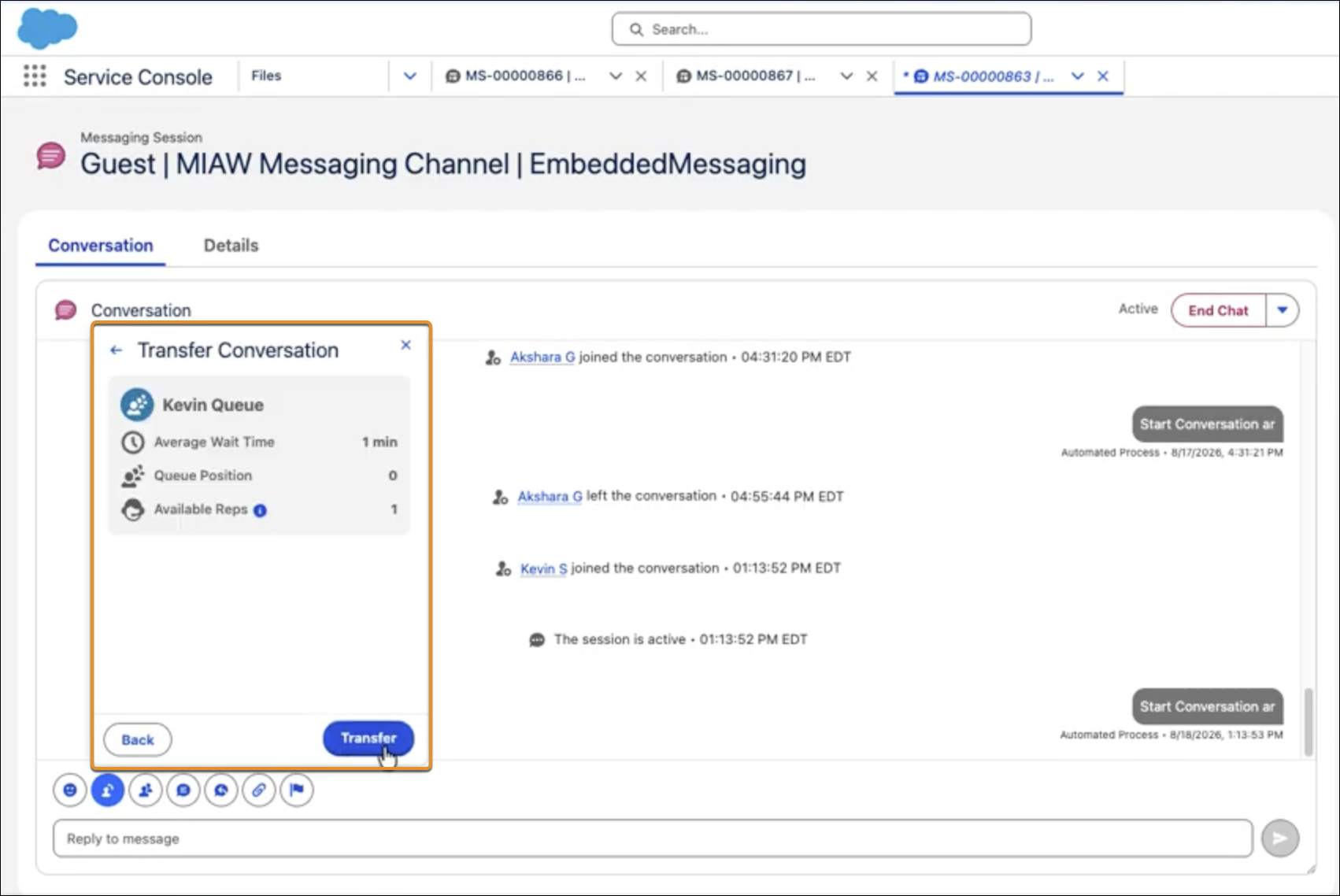
Make more informed transfer and conference decisions with queue and agent details screens. Before completing a transfer or starting a conference, customer service reps can now review the selected queue's average wait time, current queue position, and number of available reps. They can also check an agent's current workload and presence status.
Where: This change applies to Lightning Experience in Enterprise, Performance, Unlimited, and Developer editions.
Why: Previously, reps had to commit to a transfer without knowing whether someone was available or how long the customer might wait. This review step lets reps confirm queue conditions and agent availability, go back to choose another destination, or continue when the timing is right. Reps avoid handing a conversation to a queue that's already backed up or an agent who's already swamped, which cuts down on repeat transfers and gets customers to the right person faster.
How: When transferring a conversation or starting a conference, select a queue or an agent and click Next. Review the queue details, including average wait time, queue position, and number of available reps, or the agent details, including current workload and presence status. If conditions aren't ideal, go back and select a different queue or agent. When you're ready, click Transfer to complete the action.