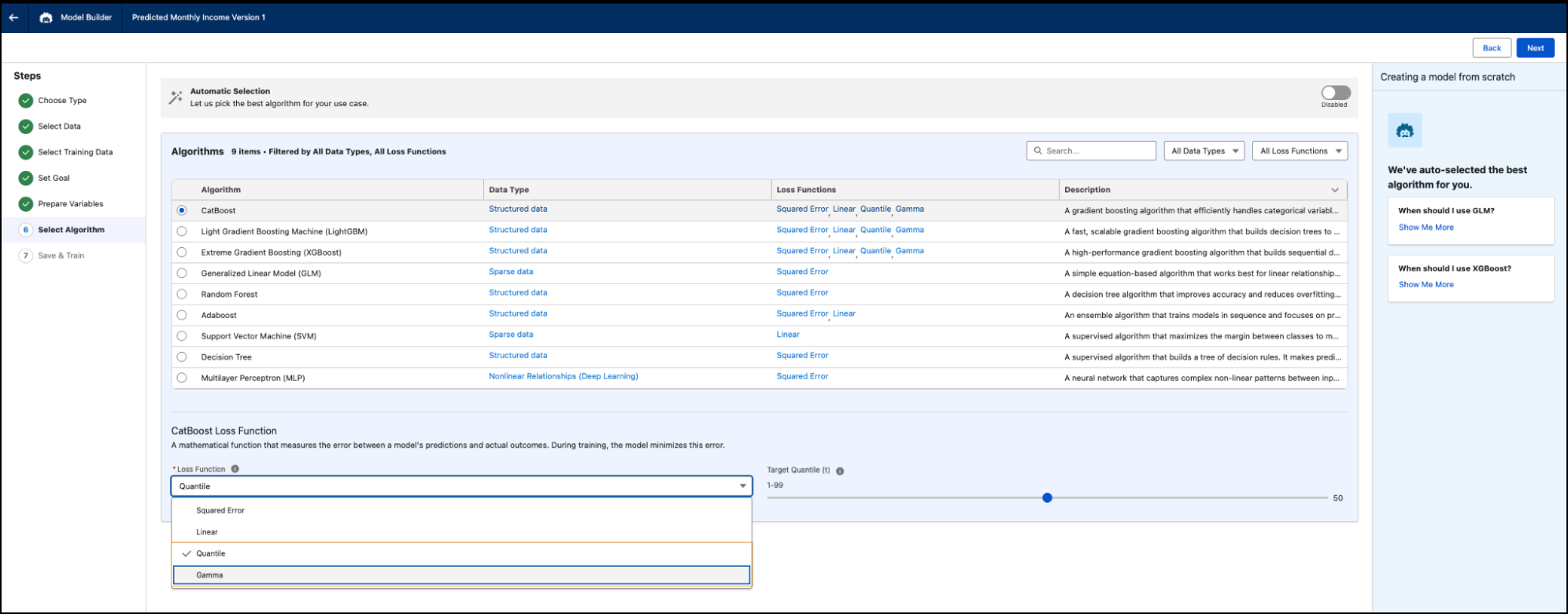
Analyze skewed data and predict specific percentiles rather than average values by selecting the Gamma or Quantile regression loss function in Model Builder. Using a loss function that aligns with your prediction goal enables the model to prioritize predictions that matter for the use case.
Where: This change applies to Lightning Experience in Enterprise, Performance, Unlimited, and Developer editions.
When: This functionality is available starting in August 2026.
Why: Different business scenarios require different prediction approaches. Standard regression models excel at predicting average values, but they struggle with skewed outcomes or target percentiles. Specifying an advanced loss function helps predict right-skewed outcomes. For example, customer spend or insurance claim amounts, or target specific metrics like the 90th percentile of delivery times.
How: In Data Cloud, go to the AI Models tab and add a predictive model with regression capabilities. During model setup, select an algorithm that supports Gamma or Quantile loss, and then select the loss function that best matches your prediction goal. Train the model and review its performance metrics.
Which loss function do I select?
-
Squared Error: Use it to predict the average expected value and want a general-purpose loss function.
-
Gamma: Use when the target is positive and right-skewed. For example, customer spend, claim amounts, or revenue, where a small number of observations can have much larger values.
- Quantile: Use it to predict a specific percentile of the target distribution rather than
its average. For example, the 90th percentile of customer spend or the 75th percentile of
delivery time.
 Note Gamma and Squared Error models use the standard regression metrics, including MAE, MSE, RMSE, and R². Quantile models use Pinball Loss and Coverage, which are designed to evaluate percentile predictions rather than average predictions.