
Switch between building your flow and testing it in one place, and reuse saved test scenarios so you don't reenter inputs every time. Use Test Mode in Flow Builder to debug and save test scenarios in autolaunched and record-triggered flows.
Where: This change applies to Lightning Experience in Professional, Enterprise, Performance, Unlimited, and Developer editions.

Why: Previously, debugging and flow testing lived in separate parts of Flow Builder. Now, you can do both in Test Mode. Run a one-off test scenario to track down an issue, then save that setup so you can run it again anytime. Or add assertions (conditions that evaluate expected results) so a reusable test scenario reports pass or fail when you run it. That's scenario testing automation. You can confirm that the flow works now and still works after you make changes.
How: From Setup, in Quick Find, enter Process, and then select Process Automation Settings. Then, select Flow Test Mode (Beta).
In Flow Builder, click Test to open Test Mode and set up a test scenario. The flow canvas switches to a test view so you can focus on test scenario setup and expected results. Limited editing of the flow is available in Test Mode.
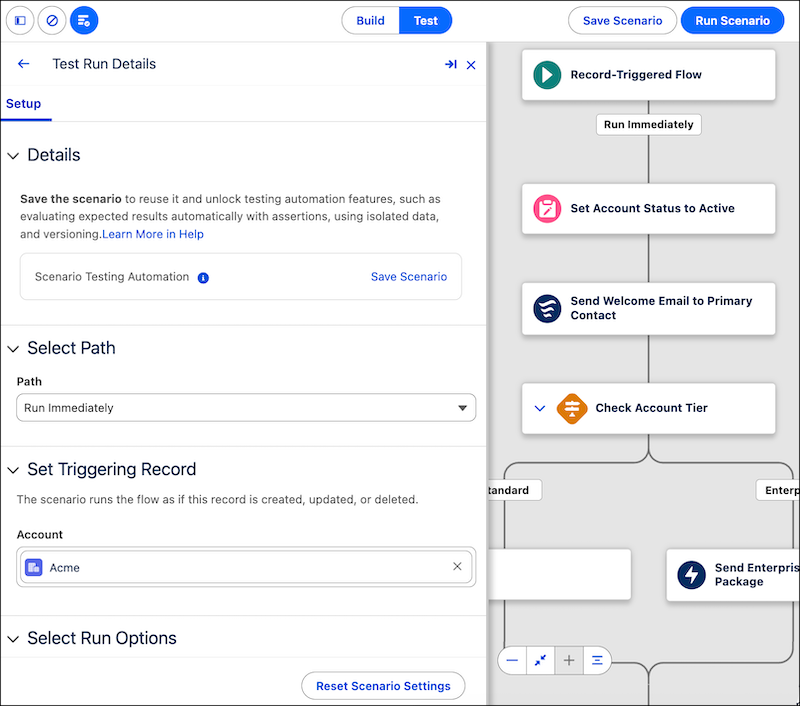
If you have no saved test scenarios, the test setup panel opens. Enter your inputs, such as which record triggers the flow or values for variables, then click Run Scenario to run the test scenario.
After a run, save the current setup as a new test scenario by clicking Save Scenario.
When you have saved test scenarios, open a scenario to see or edit its setup, run it, or run multiple scenarios.
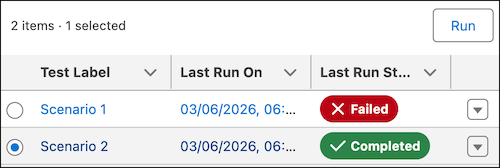
To run automated tests, select Scenario Testing Automation. Then add assertions to the test. Assertions are conditions to evaluate during the test run.
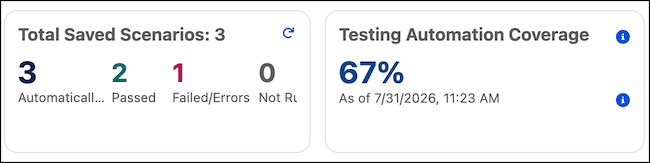
You can view the coverage of your saved test scenarios that have assertions. Coverage shows that all elements and paths ran successfully. Failed tests don't count toward test coverage.
To switch back to build mode, click Build. If you switch tests or modes without saving, you lose any unsaved changes to a test scenario.