
Test your autolaunched and record-triggered flows more reliably with mock outputs for Action and Subflow elements. Define consistent test data for external callouts and subflow responses without depending on live systems or external services. Mock outputs are available in autolaunched flows and record-triggered flows.
Where: This change applies to Lightning Experience in Professional, Enterprise, Performance, Unlimited, and Developer editions.

Why: Previously, testing flows with Action elements that make external callouts or include Subflow elements required live connections to external systems or complete subflow execution, which made testing unpredictable when external services were unavailable or returned inconsistent data.
Mock outputs let you define what data Action and Subflow elements return during test runs, so scenarios validate flow logic, not external dependencies. When you mock a callout Action element, the flow skips the actual HTTP request and uses your predefined response. When you mock a Subflow element, the flow skips the referenced flow's execution and uses the mock output you specify.
Mock outputs are particularly valuable for testing:
- Action elements with HTTP callouts to external APIs that are rate-limited or unavailable
- Action elements that invoke Apex methods with complex dependencies
- Flows that include Subflow elements, without executing the referenced flows
- Fault paths that are difficult to trigger with live data
How: From Setup, in Quick Find, enter Process, and then select Process Automation Settings. Select Flow Test Mode (Beta).
From the Flow Builder canvas, select Test to open Test Mode. Click the Action element or Subflow element that you want to mock. In the element's properties panel, click Scenario Output. Click Use Mock Output to enable mock output for this element.
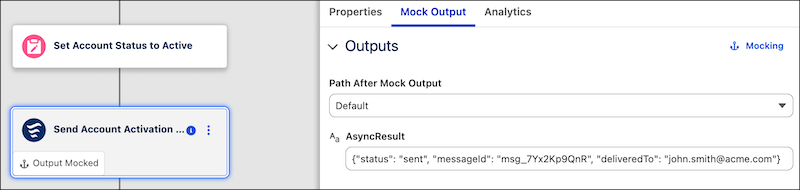
Define the mock output data for each output or copy the output values from a previous debug run in the debug history. Save your test scenario and run the test scenario. The flow uses your mock output instead of executing the Action element or Subflow element.