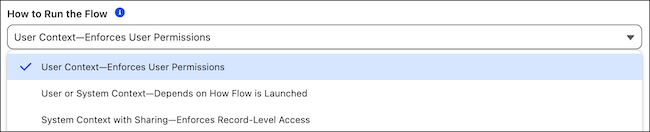
A new run context option in Flow Builder guarantees that your flow always runs with the running user's access level, regardless of what runs it. The User Context–Enforces User Permissions option is available for screen flows and autolaunched flows.
Where: This change applies to Lightning Experience in Professional, Enterprise, Performance, Unlimited, and Developer editions.

Why: Previously, flows configured to run in user context inherited elevated system-level permissions from their caller, whether another flow, Apex, or another automation. When a caller running in system context runs a flow configured for user context, the flow configured for user context inherits the caller's elevated permissions and also runs in system context.
With the User Context–Enforces User Permissions option, a flow configured with this option always runs with user-level access, giving you predictable security boundaries and full control over your flow's access level. Use this option when your flow handles sensitive operations that must respect the running user's permissions, or when you need to make sure the flow never inherits elevated permissions from its caller.
How: In Flow Builder, open your flow. Click Save, and then click Show Advanced. Under How to Run the Flow, select User Context–Enforces User Permissions. Save the flow.