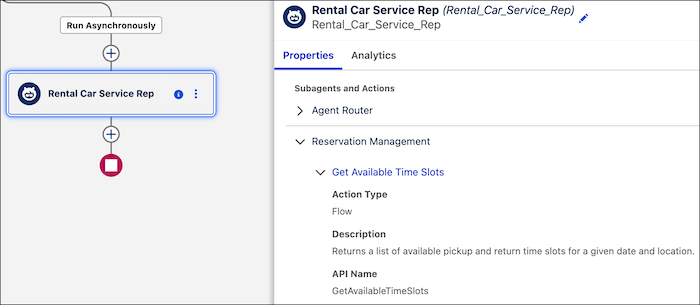
See key agent metadata, including action names, types, and brief descriptions, directly on the agent's information panel in the Flow Builder canvas, without opening the full record or navigating to Agentforce Builder. The expanded view helps you quickly assess what an agent is capable of while staying in Flow Builder.
Where: This change applies to Lightning Experience. It's available in Enterprise, Performance, Unlimited, and Developer editions with the Agentforce for Sales, Agentforce for Service, or Agentforce Platform add-on. To purchase, contact your Salesforce account executive.
Why: When you're troubleshooting or modifying a flow that another admin built, expand the agent's information panel to see which actions the agent uses without switching context to Agentforce Builder. The panel shows each action's name, type, and description, so you can spot gaps or unexpected configurations during testing. The view reflects the current state of any agent, including agents that you or another admin last configured in Agentforce Builder rather than Flow Builder.
How: In Flow Builder, select the Run Agent element and then select an agent. Expand its information panel to see the agent's assigned actions, including each action's name, type, description, and API name.