
Return compilation results for Apex classes and triggers with validation errors, instead of recompiling the entire org. Access the compilation results through Setup or the Tooling API endpoint. Salesforce automatically identifies only classes and triggers that require recompilation, reducing compilation overhead and minimizing potential runtime errors. Routinely perform this targeted recompilation to prevent runtime delays during peak traffic.
Where: This feature is available in API version 68.0 and later. This feature is available in Lightning Experience and Salesforce Classic in Enterprise, Performance, Unlimited, and Developer editions.
How: To retrieve results for invalid Apex classes or triggers, make a POST request to
the new Tooling API endpoint
/services/data/vXX.X/tooling/apexCompileResults. The request body must
be the empty JSON object {}.
POST /services/data/v68.0/tooling/apexCompileResults HTTP/1.1
Authorization: Bearer <session-id>
Content-Type: application/json

{}
Here’s an example JSON response body.
{
  "status": "PARTIAL_FAILURE",
  "results": [
    {
      "name": "MyInvalidClass",
      "namespace": "MyNamespace",
      "success": false,
      "problems": [
        { "line": 14,
          "column": 9,
          "message": "Variable does not exist: var1"
        }
      ],
      "warnings": []
    },
    {
      "name": "MyClassWithWarnings",
      "namespace": "OtherNamespace",
      "success": true,
      "problems": [],
      "warnings": [
        { "line": 0,
          "column": 0,
          "message": "Apex API version 16.0 is scheduled for retirement. Update to the latest API version to avoid compile failures"
        }
      ]
    }
  ]
}
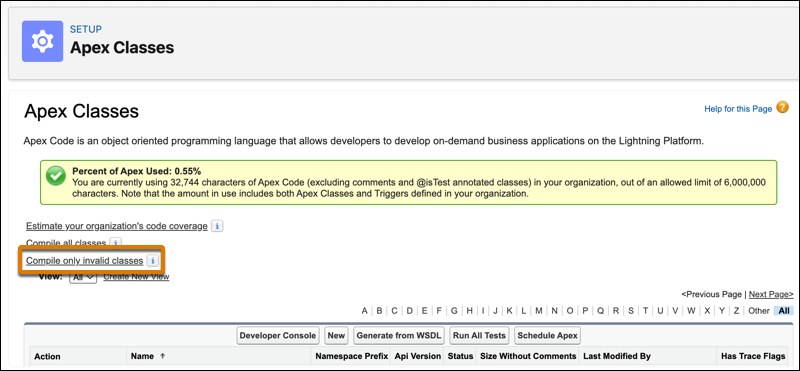
You can recompile invalid Apex classes and triggers in Setup. In the Quick Find box, enter and select Apex Classes or Apex Triggers. Then click Compile only invalid classes or Compile only invalid triggers. If the compilation is successful, you see a confirmation message. If the compilation is unsuccessful, you see a list of errors or warnings for each affected class or trigger.

Successful compilation via the “Compile only invalid classes/triggers” buttons or the
/apexCompileResults endpoint doesn’t update the corresponding
isValid field of the affected Apex classes or triggers. The value remains
false.