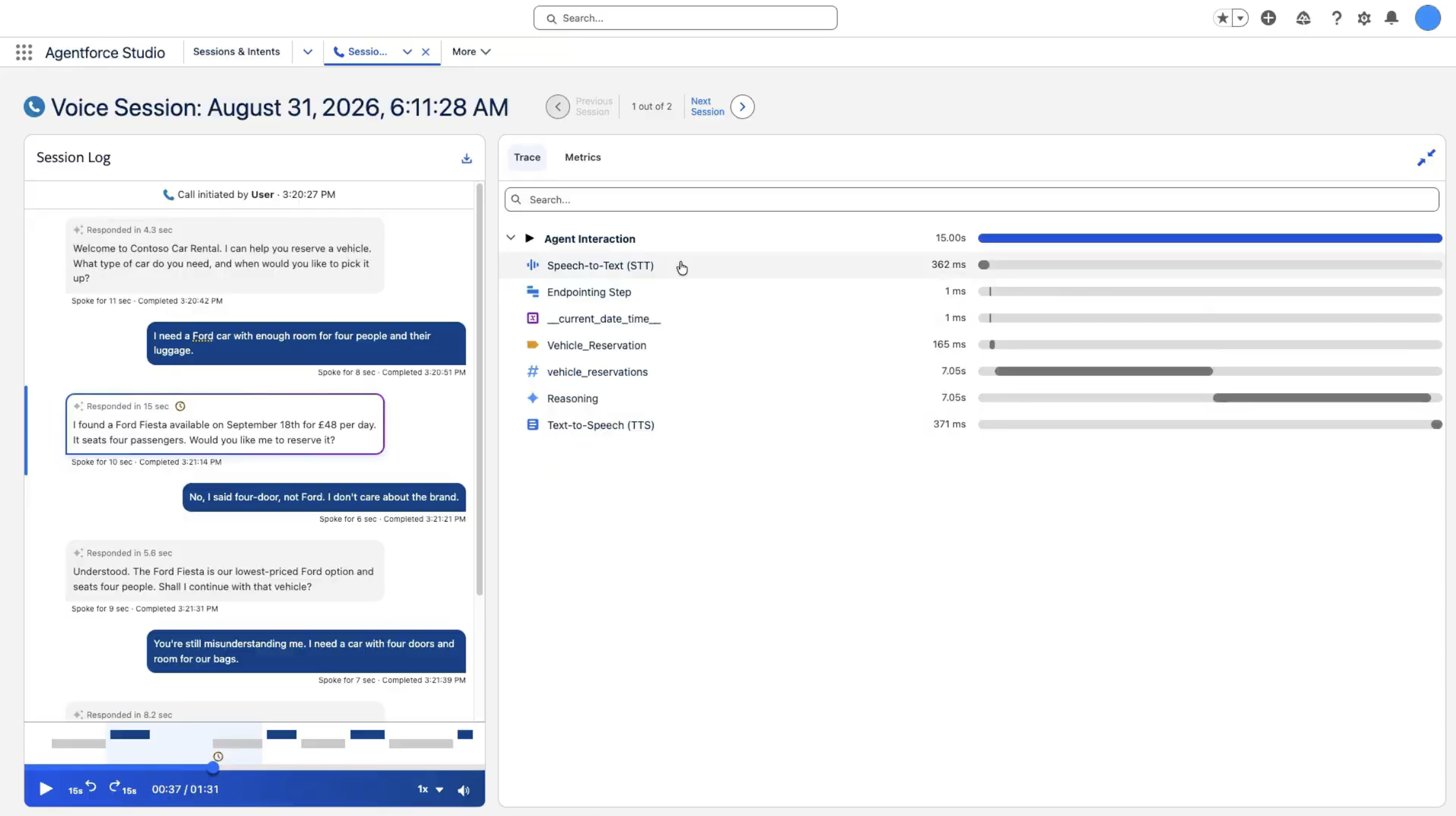
Spot long Agentforce Voice silences and inspect speech-to-text and text-to-speech timing in Session Trace, including word-level automatic speech recognition (ASR) confidence. A clock icon flags abnormal agent silence.
Where: This change applies to Lightning Experience in Enterprise, Performance, and Unlimited editions with Salesforce Foundations or Agentforce 1 Edition. Agent Optimization and Agent Analytics must be enabled.
When: This change is available in Salesforce orgs upgraded to Winter ’27 starting the week of October 12, 2026. Go to trust.salesforce.com for exact dates.
Who: To use Agent Observability, users need the Access Agentforce Optimization and Data Cloud User permission sets. To view Agent Analytics dashboards, users also need the CRM Analytics User or Einstein Analytics Plus permission set.
How: Open a Voice session. A clock icon marks long agent silence. Low-confidence words in the transcript are highlighted so you can review possible speech-to-text errors. On the Trace tab, review Speech to Text and Text to Speech processing metrics, including word-level ASR confidence scores.