Extend your agent’s capabilities with Multi-Agent Orchestration for Agentforce. Connect your Agentforce agent with other specialized Agentforce agents in your Salesforce org. Together they collaborate on complex tasks to deliver amazing outcomes for your business.
What: This release introduces new features added since the beta release.
- To deliver faster responses in multi-agent solutions, connected agents now communicate directly with users by default. Alternatively, you can have the orchestrator agent synthesize responses and manage all user communications instead.
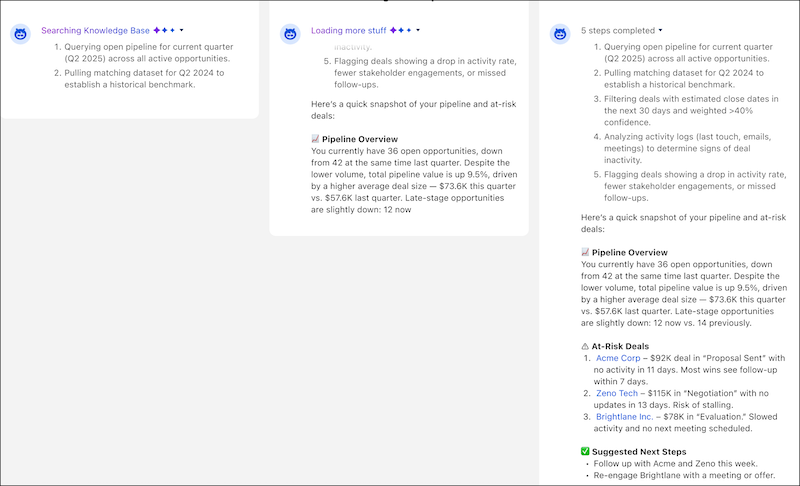
- With streaming, users now experience continuous progress with increased visibility and reduced wait times for answers.
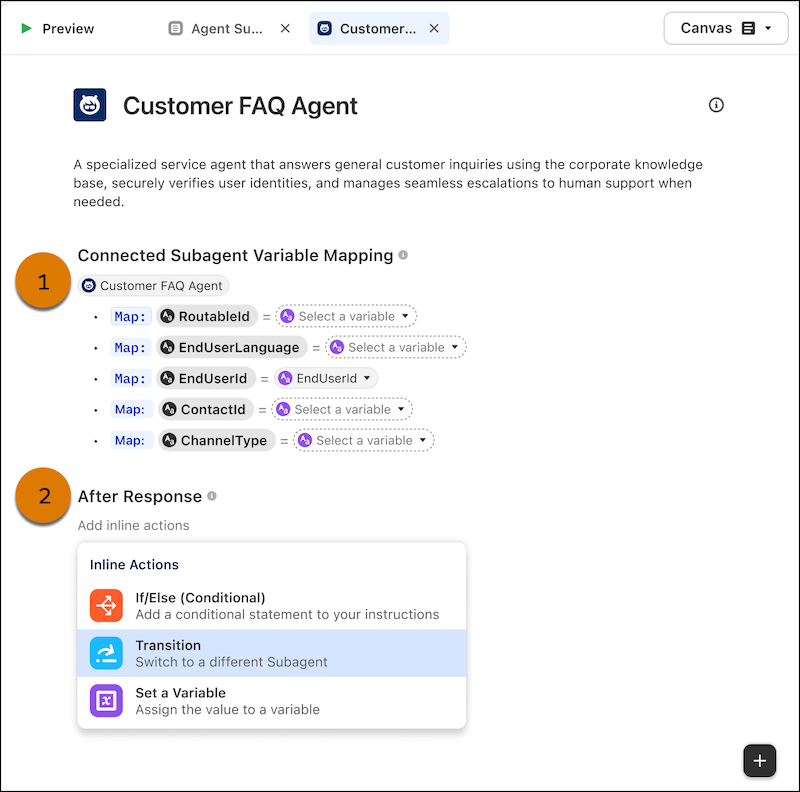
- An enhanced editor view canvas for connected subagents supports variable mapping and the ability to add inline actions in an After Response section.
- You can escalate to humans from anywhere (orchestrator agent or connected subagent) in a multi-agent journey.
- Use Testing Center enhancements to validate orchestrator delegation with a handoff assertion.
- This release adds new channels: ECv2, WhatsApp, and mobile.
- Agent picker for the Agentforce Employee agent (AEA) lists agents with connected subagents first, then individual agents. Both are sorted by creation date with the oldest first. The list shows only the active version of each agent.
Where: This change applies to Lightning Experience in Enterprise, Performance, Unlimited, and Developer editions with Foundations or Agentforce 1 editions.
When: Multi-Agent Orchestration for Agentforce (Generally Available) features started rolling out the week of August 17, 2026.
How: Create an orchestrator agent and connect one or more agents as subagents (see Connect an Agent as a Subagent).
For connected subagents, use the editor view canvas to (1) map variables, and (2) optionally create an After Response section and add inline actions.
At run time, the user sees continuous progress with reasoning updates.