
Allow Agentforce Employee agents (AEA) to act on behalf of individual users with user-based Model Context Protocol (MCP) servers. With per-user authentication, your users can access an external MCP server with their own credentials instead of a shared system-to-system connection. Eliminate shared service-user tokens and ensure a clear per-user audit trail.
Where: This change applies to Lightning Experience in Enterprise, Performance, Unlimited, and Developer editions.
When: Agentforce client per-user authentication for external MCP servers is Generally Available on a rolling basis in Salesforce orgs upgraded to Winter '27 starting the week of October 5, 2026. Go to trust.salesforce.com for exact dates.
How: Per-user authentication uses an external credential to connect to the MCP server. A Salesforce admin creates the external credential. Then, add a principal with the per-user identity type, either during the MCP server registration flow or by using Named Credentials in Setup.
When registering an MCP server, for Authentication Method, select External Credential, select an available external credential that’s in a Configured status, then select Create and Continue.
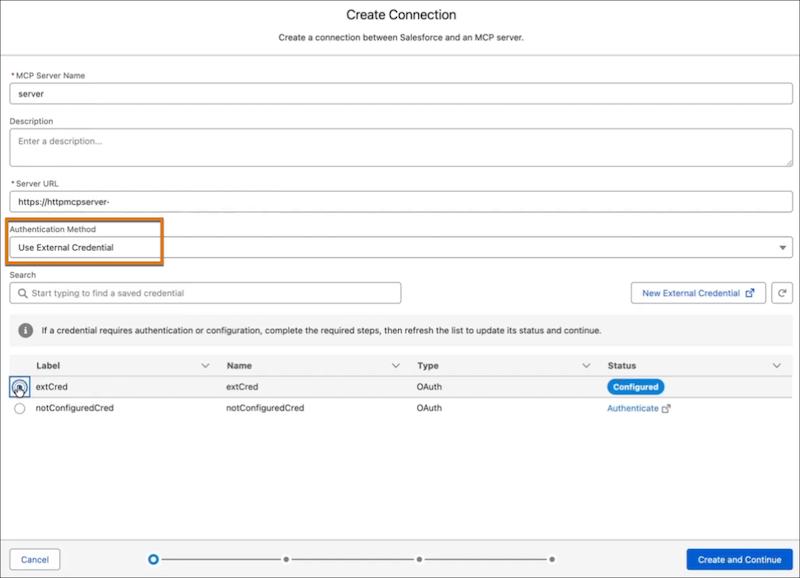
Allowlist the MCP server tools that you want, then grant user access by assigning to them the permission set associated with the external credential.

The first time a user attempts to access a tool on the MCP server, they’re prompted to provide their user credentials. Then, they're prompted to allow Salesforce to access the tool using their credentials.
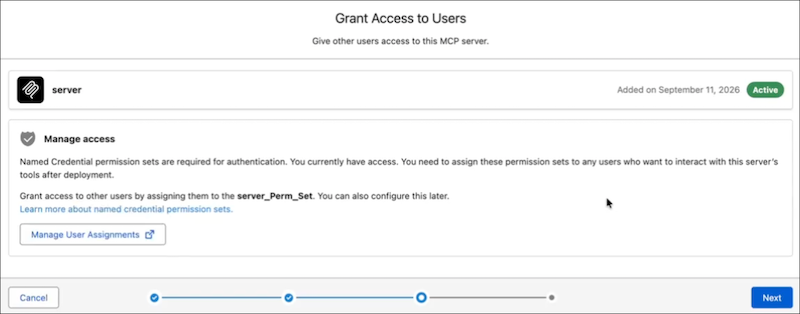
- If a user’s OAuth credentials expire, they’re prompted to resubmit their credentials.
- Users can manually allow or revoke per-user external credential authorization under their My Personal Information section.