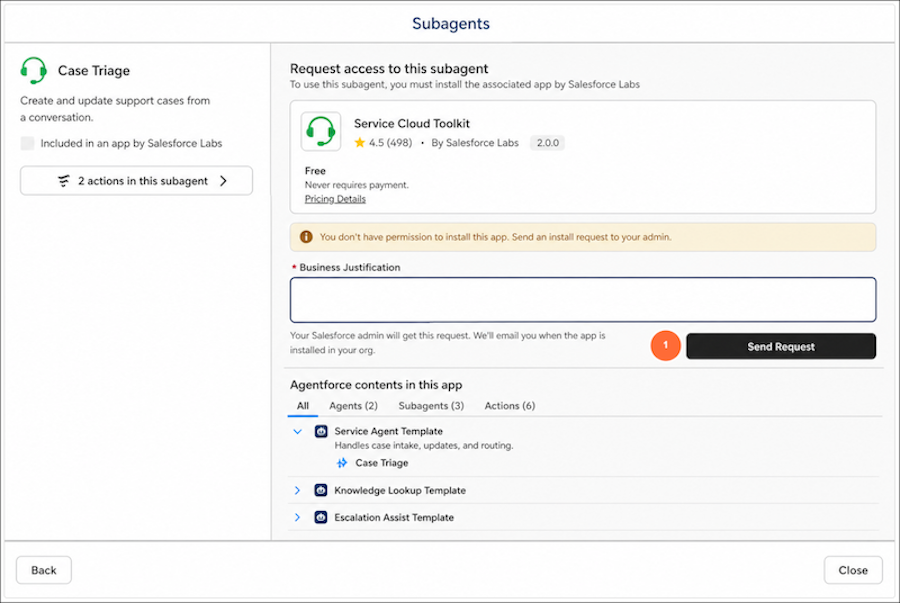
If you don't have permission to install apps, send a request to install or update an app directly from Agentforce Builder, with a business justification. Your admin gets an email and can install or reject the request. You're notified by email either way.
Where: This change is available in Agentforce Builder and Agentforce Registry for free and free-trial AgentExchange listings in non-production orgs.
Who: This change impacts Agentforce Builder users who don't have permission to install apps.

Why: Agent builders without install permission previously had no way to request installation directly. Their only option was to mark interest and hope the publisher followed up, with no visibility into status or who to ask internally. This feature gives them a direct path to request installs and track progress.
How: To browse and request an app from AgentExchange, from the App Launcher, find and select Agentforce Studio, and then open your agent. To browse subagents, from Explorer, click the + icon. To browse actions, from Explorer, select a subagent, then click the + icon. Select Add from Asset Library, then Browse AgentExchange. Open a listing and click Send Request (1).