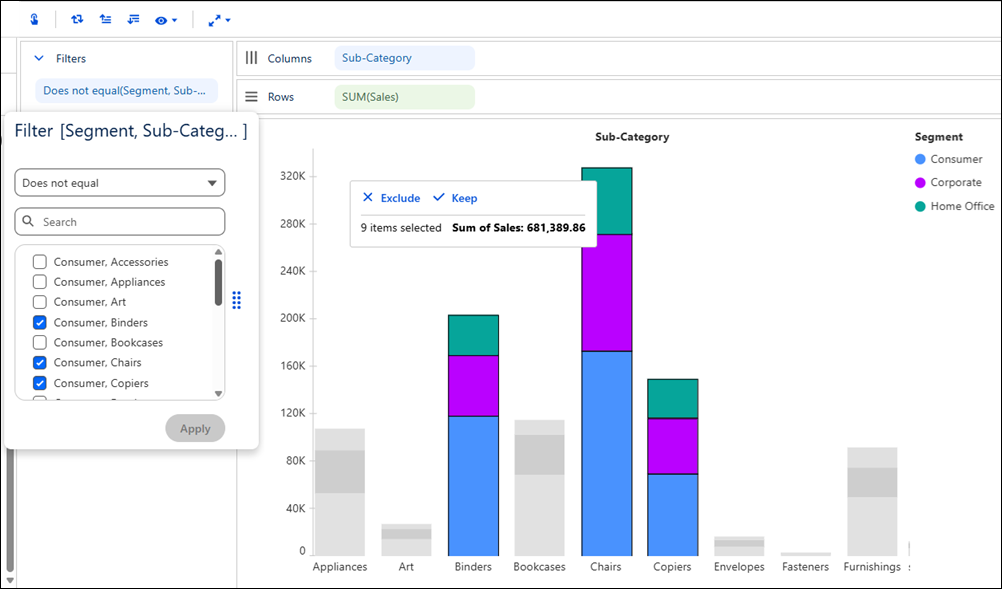
Analyze data more efficiently by keeping or excluding selected marks in a visualization, automatically creating filters based on your selections. As you iterate on your analysis, adjust the generated filter criteria in the Filters pane to continue narrowing or expanding your view. Save the visualization with the filtered data and filters you created for future analysis.
Where: This change applies to Tableau Next in Enterprise, Performance, and Unlimited editions.
Why: For example, in a bar chart that shows profit by sub-category and customer segment, exclude dominant contributors to focus on lower-performing areas of the business. Continue refining the generated filters in the Filters pane to narrow your analysis.
How: To keep or exclude selected marks, drag across one or more marks in a visualization and choose Keep or Exclude. To select multiple non-adjacent marks, hold Ctrl (Windows) or Command (Mac) while dragging. To modify the filters further, use the Filters pane.