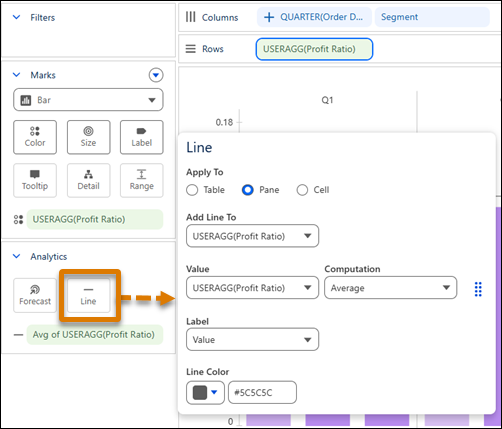
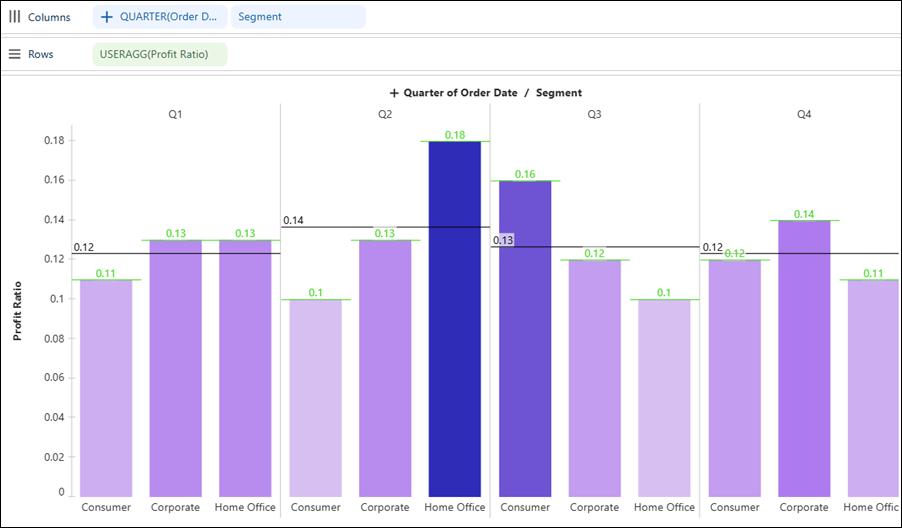
To compare performance across segments more effectively, add reference lines at the pane or cell level in your Tableau Next visualization. To align benchmarks with the time periods in your analysis, create reference lines from date part fields such as month, quarter, and year. Previously, you could apply reference lines only at the table level and create date-based reference lines only from date values.
Where: This change applies to Tableau Next in Enterprise, Performance, and Unlimited editions.
Why: For example, in a visualization that shows profit ratio by quarter and customer segment, add pane-level reference lines to compare each segment against the average profit ratio for the quarter. Add cell-level reference lines to identify the segment with the highest profit ratio in each quarter.
How: To add profit ratio as a reference line, drag the measure field onto Line. To choose where to apply the reference line and customize other settings, click Line.