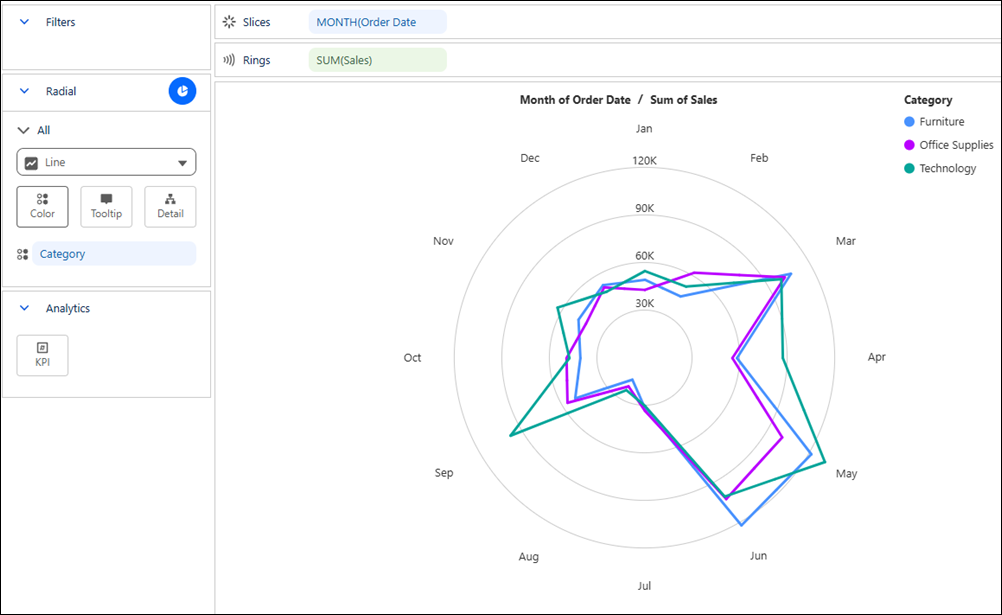
Visualize a measure over a repeating sequence to spot cyclical and seasonal patterns in a Tableau Next radial line chart. Compare multiple groups across the same cycle, such as months of the year, to identify where peaks, dips, and patterns align or differ. Because the beginning and end of the sequence appear next to each other, you can easily see whether trends continue seamlessly or change abruptly across the cycle boundary.
Where: This change applies to Tableau Next in Enterprise, Performance, and Unlimited editions.
Why: For example, compare monthly sales across product categories to identify seasonal trends. And quickly spot where sales trends follow similar patterns or diverge throughout the year.
How: To create a radial line chart, click the  thumbnail in the Show Me pane. From the Data pane, drag a date field, such as
Month to Slices. Drag the measure that you
want to visualize to Rings. Optionally to compare multiple groups, drag
a dimension, such as Product Category to
Color.
thumbnail in the Show Me pane. From the Data pane, drag a date field, such as
Month to Slices. Drag the measure that you
want to visualize to Rings. Optionally to compare multiple groups, drag
a dimension, such as Product Category to
Color.