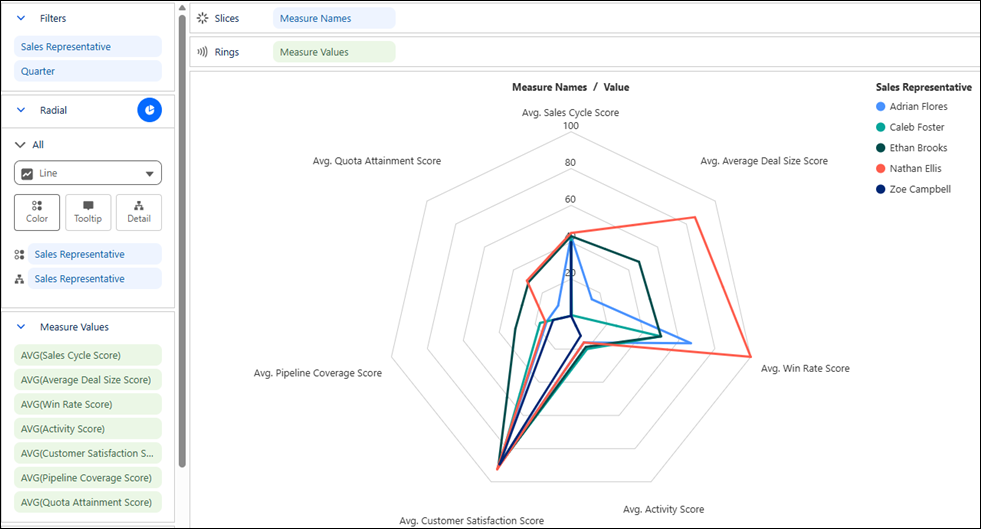
Compare entities across multiple measures with radar charts in Tableau Next. Evaluate results over time or side by side to quickly identify strengths, weaknesses, and overall performance patterns using their distinctive shapes. The Radial layout makes it easy to create these visualizations without requiring complex calculations or workarounds. Optionally, add a KPI value to the center of the chart to highlight a related aggregate metric.
Where: This change applies to Tableau Next in Enterprise, Performance, and Unlimited editions.
Why: For example, assess quarterly results for sales representatives across KPIs, such as quota attainment, win rate, and customer satisfaction scores, in a single chart to quickly identify areas of strong or weak performance.
How: To create a radar chart, click the  thumbnail in the Show Me pane. Add the measures you want to compare to
Measure Values. Drag the dimension that identifies the entities to
compare, such as Sales Representative, to
Color.
thumbnail in the Show Me pane. Add the measures you want to compare to
Measure Values. Drag the dimension that identifies the entities to
compare, such as Sales Representative, to
Color.