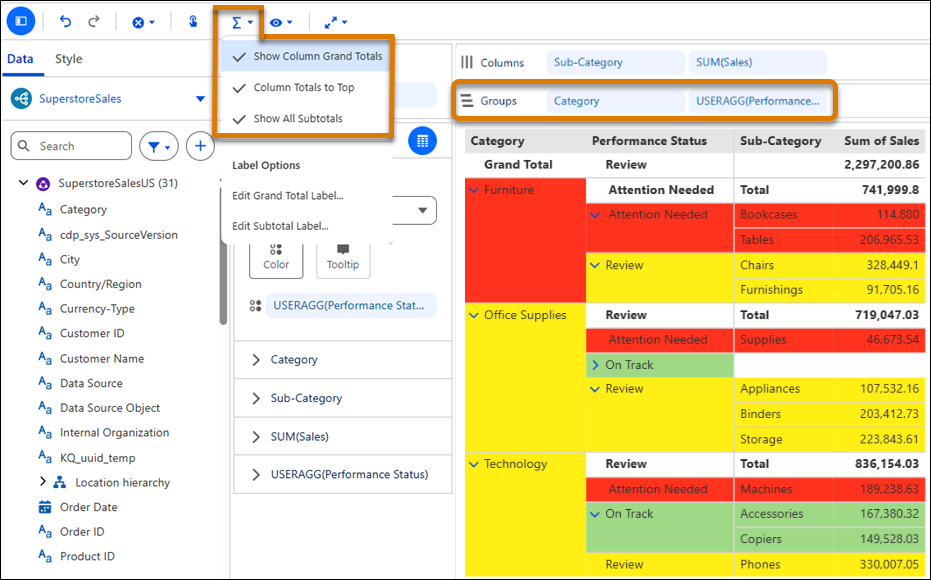
In Tableau Next table layout, categorize large datasets into logical groups to quickly review subtotals and totals in the collapsed view. Drill into the underlying details as needed in the expanded view. Group by calculated fields and apply conditional formatting to highlight data segments that require attention. Preserve your row groups when you switch to other layouts, making it easy to continue exploring the same data in different visualizations.
Where: This change applies to Tableau Next in Enterprise, Performance, and Unlimited editions.
Why: For example, in table layout, group sales data by product category to compare sales totals and subtotals. Group each category into performance segments using a calculated field based on profit ratio. Apply conditional formatting to highlight underperforming segments easily. Expand segments to investigate the underlying sub-categories.
How: To group rows, drag a dimension or calculated field to the Groups shelf. From the Totals menu, select options to show totals and subtotals. To apply conditional formatting, drag the same field to Color.