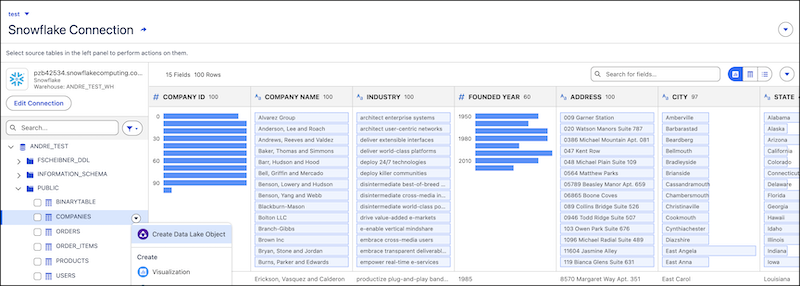
Explore large data lake objects (DLOs), data model objects (DMOs), and external tables in data connections directly from your Tableau Next workspaces. Now, you can also profile external tables in a live data connection before creating a data lake object, so you can review the data and bring in the right table. Summarize, filter, sort, and drill down into data right in your flow of work. You can easily streamline your view to discover key metrics, identify data relationships, and analyze distributions.
Where: This change applies to Tableau Next in Enterprise, Performance, and Unlimited editions.
How: From your Tableau Next workspace, click +Add, and then select Data. Add your data and begin exploring by using one of these methods.
- To add an existing DLO or DMO, select the data object, and then click
Add. To begin exploring, click the DLO or DMO to open it directly.
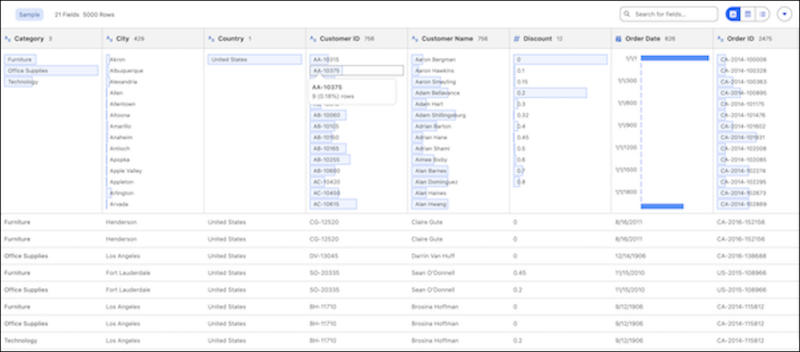
- To add data from a connection, select an existing data connection or create one, and then
click Add. You can view the data profile of an external table directly
before creating a data lake object, and then add the right table as a data object for further
analysis.