Respond Faster and More Accurately to Customers with Service Replies in Service Assistant
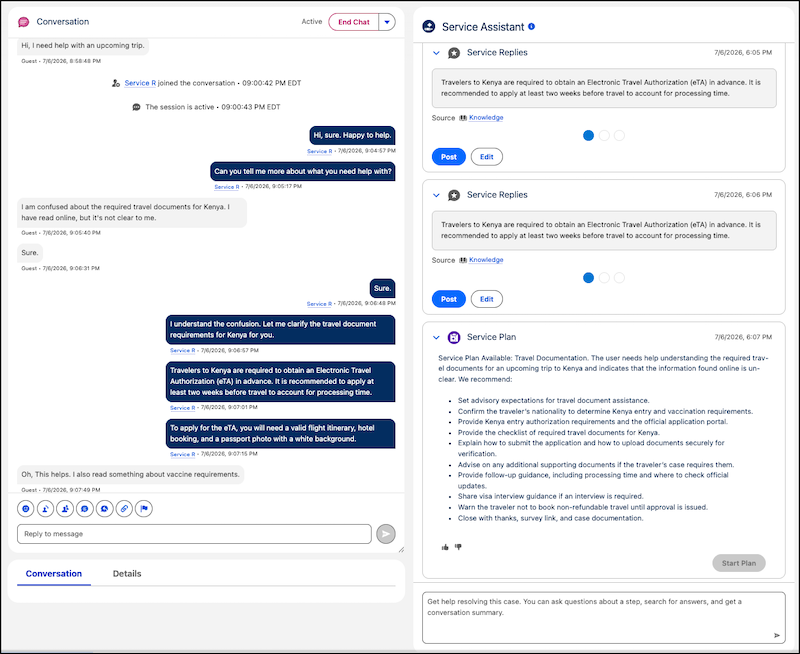
Quickly respond to customer messages during a messaging session with Service Replies in Service Assistant. Service Assistant now supports service replies, allowing reps to reply to customers even faster. By automatically surfacing context-aware responses grounded in the conversation and your knowledge base, Service Assistant displays each reply alongside the service plan steps. This provides service reps with a more comprehensive resolution workflow directly, eliminating the need to switch to a separate Service Replies component.
Where: This change applies to Lightning Experience in Enterprise, Unlimited, and Developer editions with the Agentforce for Service or Agentforce 1 add-ons. This feature requires the Service Planner and Adaptive Experience add-ons.
Feature Support: This feature is supported in Service Assistant for Messaging with Enhanced Chat, Facebook, and WhatsApp channels.
When: This feature is available starting July 21, 2026.
Who:
- To set up Service Replies for Service Assistant, Salesforce admins need these permissions.
- Service Planner Builder
- Service Replies User
- Prompt Template Manager
- Data Cloud Architect (only required if grounding replies with a data library)
- To use Service Replies for Service Assistant, service reps need these permission sets.
- Service Planner User
- Service Replies User
How: Service Replies is available for setup without completing the full Service Assistant setup, including creating a Service Assistant agent. The only Service Assistant-specific setup required to access Service Replies in Service Assistant is to turn on Service Assistant for Messaging from the Customize Experience by Object section on the Service Assistant setup page, and then add the Service Assistant component to the record page. Afterward, complete the Service Replies for Chat setup, and turn on Service Replies for Service Assistant on the Service Replies setup page. Replies are then generated in the component after the first message.