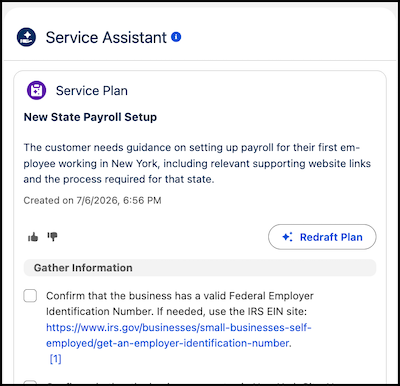
Service reps can now click hyperlinks directly within plan steps to access external resources, training materials, or corporate policies. Links included in your subagent instructions or knowledge articles are now easily accessible in plan steps as clickable links that open automatically in a new tab.
Where: This change applies to Lightning Experience in Enterprise, Unlimited, and Developer editions with Einstein for Service, Agentforce for Service, and Agentforce 1 add-on licenses. This feature requires the Service Planner Add-on license.
Feature Support: This feature is supported in Service Assistant for Case with guidance plans.
When: This feature is available starting June 30, 2026.
Why: Previously, service plans showed URLs as plain text, which required service reps to manually copy and paste the text URL into a separate tab. Now, resources that contain hyperlinks in your subagent instructions and knowledge articles are easily accessible to service reps in plan steps.
How: This feature is enabled automatically. No setup is required. Links embedded in
your subagent instructions or knowledge articles using the full URL
(https://example.com) or as anchor links (<a
href="https://example.com">click here</a>) show as hyperlinks in plan steps. Links
in subagent instructions and knowledge articles are automatically trusted and always render as
hyperlinks. Any URL that isn't explicitly registered in your organization's Trusted URLs list
shows as plain text in a service plan step.