
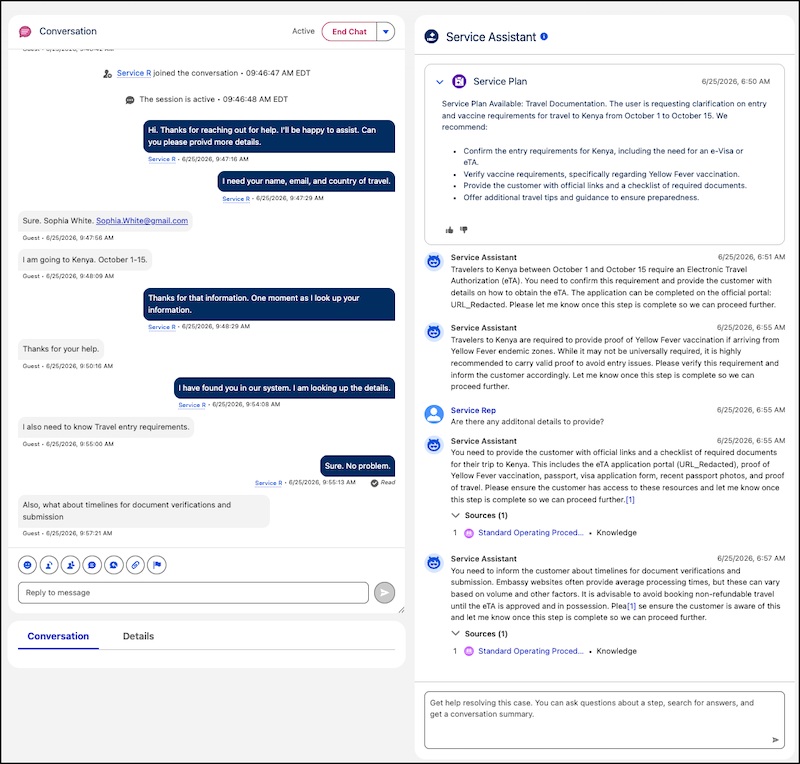
Service reps now receive conversational, step-by-step resolution guidance from Service Assistant with dynamic service plans. With dynamic service plans, Service Assistant automatically monitors a case or messaging session as it progresses and updates the steps of the plan in real time. For each step of the plan, Service Assistant performs a fresh review of the active record data, subagent instructions, knowledge articles, and agent actions to provide the most accurate resolution. In addition, dynamic service plans provide access to the Service Assistant chat where service reps can ask the agent for knowledge information on demand, look up customer information, and ask to execute agent actions.
Where: This change applies to Lightning Experience in Enterprise, Unlimited, and Developer editions with Agentforce for Service and Agentforce 1 add-ons. This feature requires the Service Planner and the Adaptive Experience add-ons.
Feature Support: This feature is supported in Service Assistant for Case and Messaging.
When: This feature is available starting July 21, 2026.
Who:
- To set up dynamic service plans for case and messaging, Salesforce admins need the Service Planner Builder permission set.
- To use dynamic service plans for case and messaging, service reps need the Service Planner User permission set.
- To create dynamic service plans for messaging sessions, the ServicePlanner User requires the
Agent Messaging Access custom permission set that includes these permissions. No additional
permissions are required for dynamic plans for case.
- App permission: Access Conversations Entries
- Messaging Sessions object permission: Read, View All Fields
Why: Previously, Service Assistant only provided issue resolution guidance for cases. Now, Service Assistant is an autonomous, real-time agent for messaging sessions that adapts in real time to fast-paced conversations, providing active resolution guidance grounded in your knowledge articles and surfacing relevant actions directly to service reps.
How: Complete the general setup steps for Service Assistant for Case or Messaging and then turn on Dynamic Service Plans from the Case or Messaging tab of the Service Assistant Setup page.
See Also
- Salesforce Help: Service Plans
- Salesforce Help: Complete General Setup
- Salesforce Help: Set Up Service Assistant for Case
- Salesforce Help: Set Up Service Assistant for Messaging
- Salesforce Help: Mandatory Permissions
- Salesforce Help: Service Assistant for Case Permissions
- Salesforce Help: Service Assistant for Case Permissions