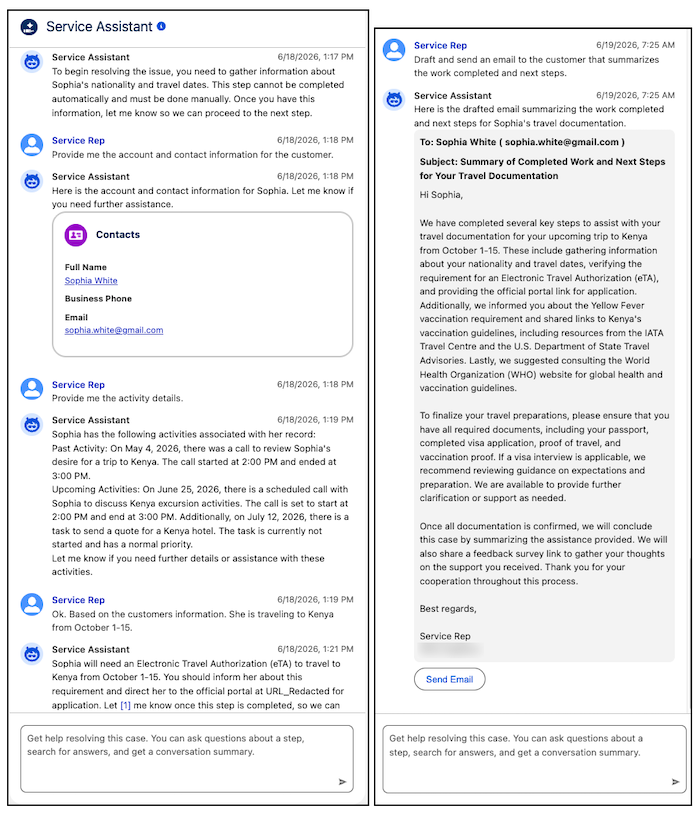
Service reps can now interact directly with Agentforce Service Assistant with an agent chat box. When working a service plan, service reps can receive extra resolution support by using the agent chat box to ask Service Assistant questions, look up knowledge information, and draft emails and service plan summaries without leaving the Service Assistant component.
Where: This change applies to Lightning Experience in Enterprise, Unlimited, and Developer editions with the Agentforce for Service or Agentforce 1 add-ons. This feature requires the Service Planner and Adaptive Experience add-ons.
Feature Support: This feature is supported in Service Assistant for Case and Messaging.
When: This feature is available starting July 21, 2026.
Who:
- To set up agent chat for Service Assistant Chat, Salesforce admins need the Service Planner Builder permission set.
- To use Agent Chat, service reps need the Service Planner User permission set.
- The ServicePlanner User (agent user) doesn’t require any specific permissions to access this feature.
Why: Previously, service reps relied only on the structured steps within a service plan to work. Now, they can use the Agent Chat interface to interact directly with Service Assistant for both guidance and dynamic plans to ask questions, look up account details and knowledge articles, and execute actions on demand, all without leaving the component. The chat experience for Service Assistant has context of the entire plan, conversation history, and record details to deliver grounded and accurate support. For Service Assistant, the chat experience is powered by the General CRM and General FAQ subagents, which grant Service Assistant access to gather and query information beyond the record details. Each subagent comes with standard actions, like Get Record Details and Draft and Revise Email. You must add these subagents to your agent.
How: Add the General FAQ and General CRM subagents to your Service Assistant agent. For dynamic service plans available for both Service Assistant for Case and Messaging, the chat interface is available by default when you turn on dynamic plans for each object in the Service Assistant Setup page. For guidance service plans available for Service Assistant for Case, you must turn on Chat with Service Assistant in the Guidance Plans section of Case tab in the Service Assistant Setup page. For Case, only one plan type can be enabled at a time: dynamic or guidance.