
Get ready for a new Service Assistant experience. Evolving beyond static checklists, Service Assistant now delivers conversational, real-time issue resolution guidance. Service Assistant conversationally guides service reps step-by-step through issue resolution, continuously monitors the record for new information, and dynamically updates the plan in real-time by surfacing knowledge information and completing step tasks with agent actions. In addition, Service Assistant provides a dedicated agent chat experience, providing service reps additional issue-resolution support where they can launch actions and look up knowledge information on demand. Further, Service Assistant now supports messaging sessions to provide reps real-time resolution guidance that keeps pace with the fluid, fast-moving conversations. You can also create multiple Service Assistant agents so that you can specialize each agent to a business unit, record type, or queue.
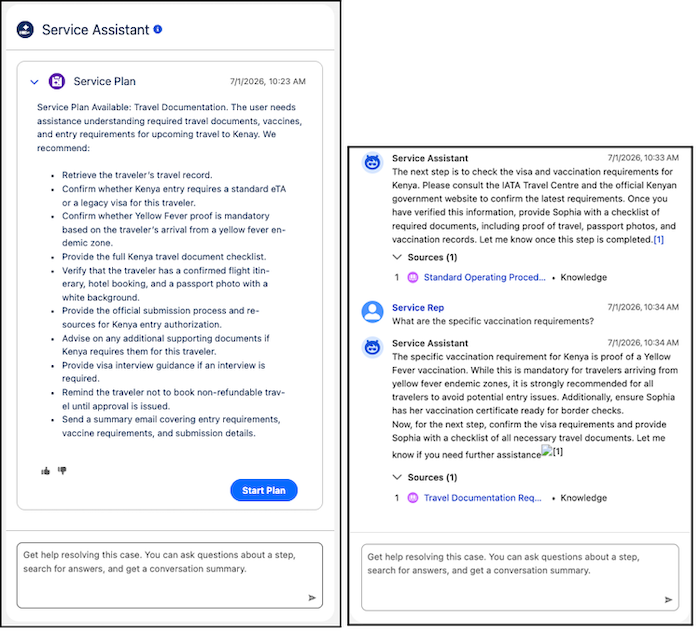
The features described in the release notes are available on two dates. Certain features are generally available on June 30, 2026, while others are in preview and available starting July 21, 2026. The preview release notes give you advanced notice for the enhancements coming to Service Assistant. For a general overview of the new Service Assistant, review our Trailhead Quick Look: Get to Know the New Service Assistant.
Each release note identifies the permissions, supported objects, and licenses required. Certain features require the new Adaptive Experience Add-on license, which is in addition to the Service Planner Add-on license. The Where section of each release note specifies the exact licensing requirements. For customers with existing implementations of Service Assistant, review Service Assistant Operational Considerations for an overview of the changes in the new experience.
The Adaptive Experience Add-on license becomes available for provisioning starting July 21, 2026. If you're interested in features that require this license, contact your account executive to discuss your options and ensure you're ready when these capabilities become available. Updated billing and consumption information for the preview features is forthcoming on July 21, 2026.
At this time, Service Assistant isn’t supported in the new Agentforce Builder. Starting in July 2026, the requirement that new agents can only be created in the new Agentforce Builder doesn’t apply to Service Assistant. You must continue to use the legacy builder. We’ll provide a release note in advance of when Service Assistant is supported in the new builder.
Service Assistant features are released as often as monthly, so check here for the latest information.
- Scale Service Assistant Across More of Your Business with Multiple Agents
Create multiple Service Assistant agents that are specialized with specific subagents and instructions to provide tailored support for particular business units, products, or channels. - Access Resources Linked in Plan Steps with Clickable URLs
Service reps can now click hyperlinks directly within plan steps to access external resources, training materials, or corporate policies. Links included in your subagent instructions or knowledge articles are now easily accessible in plan steps as clickable links that open automatically in a new tab. - The Summarize Case Quick Action for Service Assistant Is Being Retired
The Summarize Case quick action that appears in the steps of guidance service plan for Service Assistant for Case is being retired starting June 30, 2026 due to the retirement of Work Summaries for Case. After the quick action is retired, you can't summarize a case directly from a plan step or the post or feed tabs. Instead, use the Enhanced Summaries component to draft case summaries that include service plan information. - Get Real-Time Issue Resolution with Dynamic Service Plans
Service reps now receive conversational, step-by-step resolution guidance from Service Assistant with dynamic service plans. With dynamic service plans, Service Assistant automatically monitors a case or messaging session as it progresses and updates the steps of the plan in real time. For each step of the plan, Service Assistant performs a fresh review of the active record data, subagent instructions, knowledge articles, and agent actions to provide the most accurate resolution. In addition, dynamic service plans provide access to the Service Assistant chat where service reps can ask the agent for knowledge information on demand, look up customer information, and ask to execute agent actions. - Automate Service Plans with Agent Actions
Service Assistant now supports standard and custom agent actions to automatically complete service plan steps. - Contextualize Dynamic Service Plans with Citations
Build trust and transparency in service plans with citations of the knowledge articles that are used to create the step. Each step created from your knowledge articles now cites its source, so service reps can quickly verify the guidance and access the knowledge article directly from the step. - Enable Guidance Plans for Cases with a Toggle
The Guidance Plans toggle on the Service Assistant Setup page is back. Use it to enable or disable guidance plans for cases. If you’re already using guidance plans, the toggle is enabled by default. If you’re using dynamic plans, it’s disabled. - Provide Service Reps Dynamic, Real-Time Issue Resolution Guidance for Messaging Sessions
Service Assistant brings real-time, conversational issue resolution guidance to messaging sessions. Service reps receive dynamic, step-by-step service plans that adapt instantly to live conversations and automate plan steps with agent actions. In addition, service reps can receive additional, on-demand support using the agent chat box. - Know When Service Plan Creation is in Progress with a Status Indicator
Service reps now see a status indicator in the component that signals a service plan is being created. Previously, the component gave no indication that a plan was in progress, so reps had to wait until the plan summary appeared without knowing whether anything was happening. - Work With Service Assistant After a Messaging Session Ends
When a messaging session ends, service reps can finish wrap-up tasks such as asking for a session summary, drafting a follow-up email, asking knowledge questions, or getting general help using the agent chat. Service Assistant and the chat box stay available for 24 hours after the session closes, and all interactions are saved to the component feed. - Use the Service Assistant Chat to Receive Additional Resolution Assistance
Service reps can now interact directly with Agentforce Service Assistant with an agent chat box. When working a service plan, service reps can receive extra resolution support by using the agent chat box to ask Service Assistant questions, look up knowledge information, and draft emails and service plan summaries without leaving the Service Assistant component. - Provide Service Reps with Immediate Case and Customer Context with Case Catch-Up & Insights
Instead of spending time catching up on case details, your service reps now get a 360-degree view of a customer and key case details directly within the Service Assistant component. When a rep opens a case record, Case Catch-Up & Insights displays AI-generated summaries of the case, associated account, customer sentiment, and case health score. - Respond Faster and More Accurately to Customers with Service Replies in Service Assistant
Quickly respond to customer messages during a messaging session with Service Replies in Service Assistant. Service Assistant now supports service replies, allowing reps to reply to customers even faster. By automatically surfacing context-aware responses grounded in the conversation and your knowledge base, Service Assistant displays each reply alongside the service plan steps. This provides service reps with a more comprehensive resolution workflow directly, eliminating the need to switch to a separate Service Replies component. - Start Messaging Service Plans Automatically
Service reps start issue resolution for messaging sessions faster with the automatic execution of dynamic service plans once the service plan summary is generated. This feature removes the need for service reps to click Start Plan and allows your service reps to focus on fast-paced, live customer interaction and receive a service plan right away.