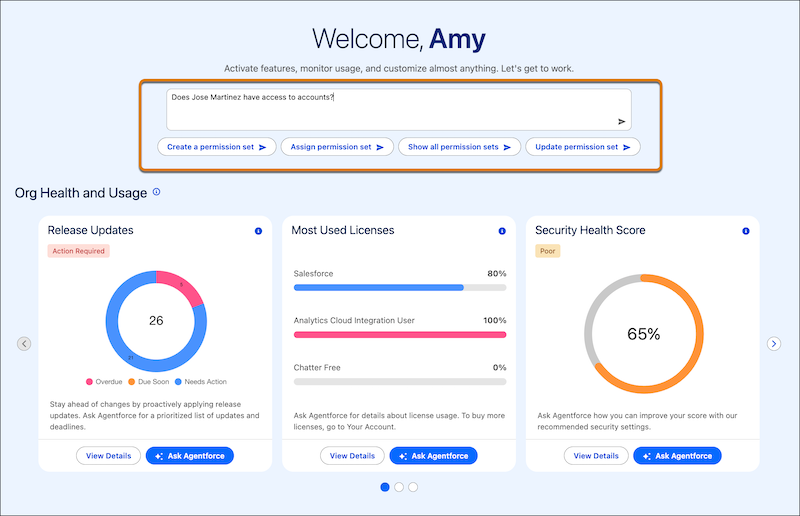
Work with an AI agent to complete tasks, manage your Salesforce org, and troubleshoot issues directly in Setup. Setup with Agentforce makes you more productive by streamlining tasks and reducing clicks. Instead of navigating to multiple Setup pages and researching best practices, simply chat with the Setup agent to get guidance and help completing your work. This feature, now generally available, includes improved agent responses and more supported tasks since the initial beta release.
Where: This feature is available in Lightning Experience in Enterprise, Performance, Unlimited, and Developer editions with Foundations or Agentforce 1 editions.
Salesforce orgs are allocated 500 free Setup agent actions per month across all users in the org. This limit resets on the first of the month.

When: This feature is generally available starting late May 2026.
Why: Setup with Agentforce supports many administrative tasks, including:
- Managing users
- Troubleshooting user access
- Managing permission sets, permission set groups, organization-wide defaults, and sharing rules
- Creating custom objects and fields
- Creating and managing flows
- Getting information from Salesforce Help
- Navigating to the right Setup page to complete a task
- Creating a custom report type
- Creating Lightning pages
- Creating, modifying, and getting an explanation of formulas
- Getting information about org health, usage, and licenses
You can also ask the Setup agent, “What can you do?” for more details about specific Setup areas.
How: To enable this feature, in Setup, go to Setup with
Agentforce. After assigning permissions and completing Agentforce and Data 360
prerequisites, enable Setup with Agentforce. Refresh the page. You can
start a conversation with the agent from Setup Home or on any other Setup page by clicking the
Ask Agent for Setup button ( ).
).