The Triple Data Encryption Standard (Triple DES) algorithm is no longer supported for SAML single sign-on (SSO). If your configuration still uses Triple DES, users can’t log in via SSO. This change applies to all SSO configurations that use the Triple DES algorithm, whether you use Salesforce as an identity provider or as a service provider. To improve security, use the Advanced Encryption Standard (AES) algorithms, AES 128 or AES 256, instead.
Where: This change applies to Lightning Experience and Salesforce Classic in all editions.
Why: The Triple DES algorithm uses a cryptographic key that’s too short to be secure. The AES 128 and AES 256 algorithms use longer keys that make these algorithms harder to attack. For more information about encryption algorithm security from the National Institute of Standards and Technology, go to https://csrc.nist.gov/pubs/sp/800/131/a/r3/ipd.
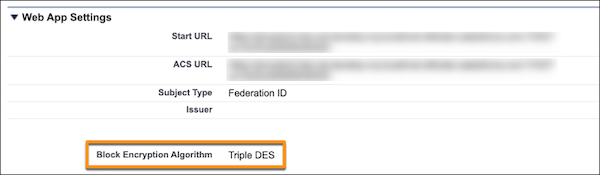
How: If you use Salesforce as an identity provider, check your connected app SAML configuration. First, go to your connected app Web App Settings and check the Block Encryption Algorithm setting. If Block Encryption Algorithm is set to Triple DES, update your configuration to use a more secure algorithm. On the service provider, update your settings to decrypt the new algorithm.
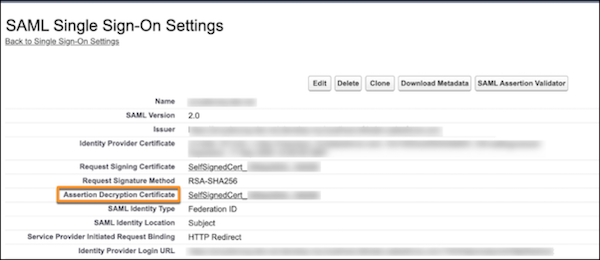
If you use Salesforce as a service provider, check with your identity provider to see what encryption algorithm they use. If they use the Triple DES algorithm, work with your identity provider to use a more secure algorithm and to generate a new decryption certificate. In Salesforce, update the Assertion Decryption Certificate in your SAML Single Sign-On Settings.