
You can now set up and maintain your Field-Level Encryption (FLE) policy directly from the Shield app. The new UI makes it easier to review encryption blockers, enable or disable encryption for fields, and update encryption schemes. The legacy UIs for managing FLE are still available in Setup and in the Shield Extension managed package.
Where: This change applies to Lightning Experience in Enterprise, Performance, Unlimited, and Developer editions with the Salesforce Shield or Shield Platform Encryption add-on license.
When: The Field-Level Encryption page in the Shield app is available starting in July 2026.
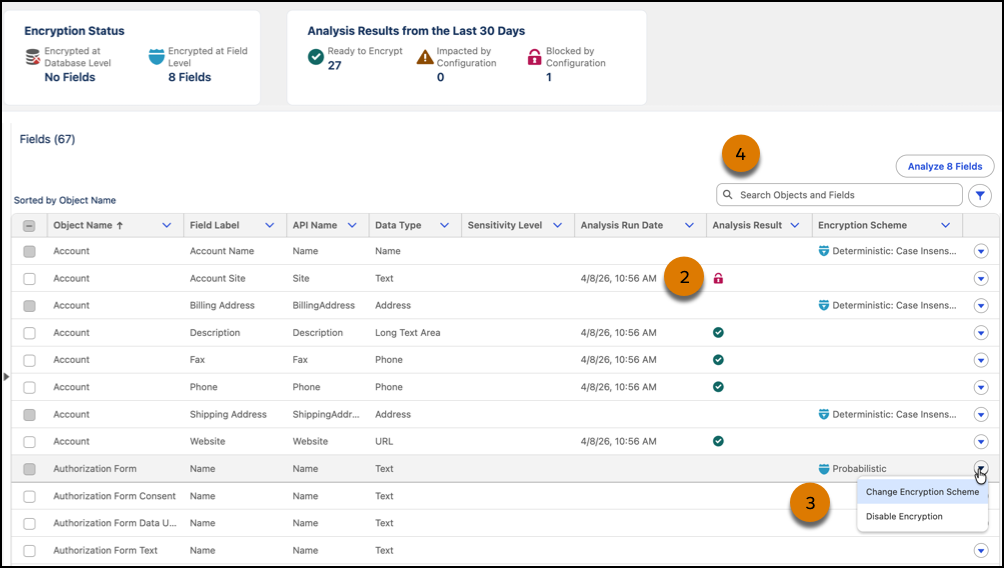
How: In the Shield app, click the Platform Encryption tab, and then click Field Level Encryption. 1) Use the Analyze tool to find out which fields are ready to encrypt and if org configurations impact or block encryption.
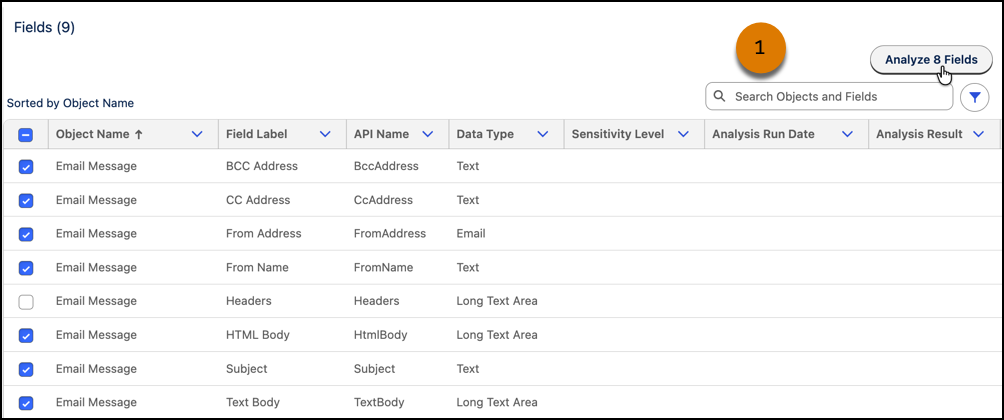
2) Review the results of your analysis right in the app, and 3) encrypt and update encryption schemes on fields that are ready. 4) Search, filters, and multi-field select options save you time, especially when you have several fields to manage. Cards at the top of the page show a summary of analyses and how much of your data is encrypted.
The Field-Level Encryption page of the Shield app is available in English only.