
View Authentication Context Class Reference (ACR) Values in the Login History and Login Events
You can now use the login history and login events to see Authentication Context Class Reference (ACR) values sent by your single sign-on (SSO) identity provider. Use this information to determine whether your identity provider uses a strong or weak authentication method. SSO logins with strong ACR values can skip device activation.
Where: This change applies to Lightning Experience and Salesforce Classic in all editions.
How: Go to the Login History in Setup. Create a view that includes the new Authentication Context Class Reference column (1).
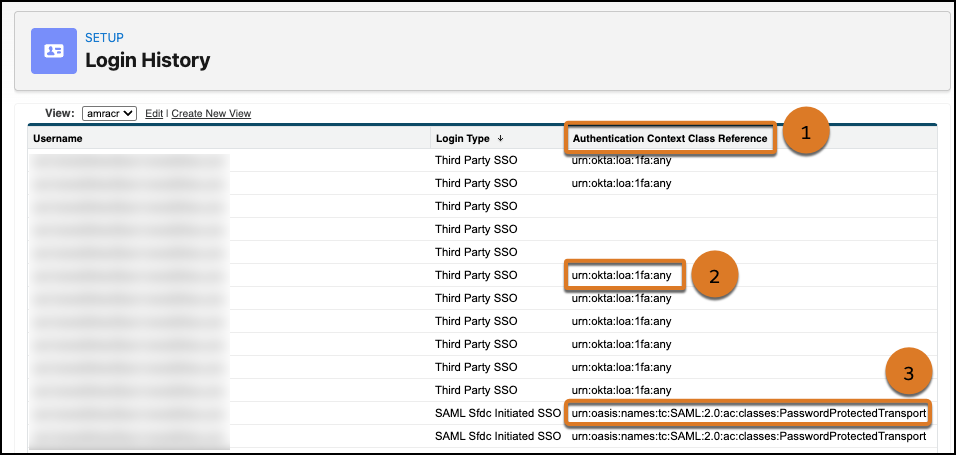
For OpenID Connect SSO, this column contains the value of the acr claim in the
ID token. In this example, the value is urn:okta:loa:1fa:any (2).
{
  "sub": "XYZ...",
  "name": "Admin User",
  "email": "companyemail@example.com",
  "ver": 1,
  "iss": "https://MyIdentityProvider.com",
  "aud": "XYZ...",
  "iat": 1775666586,
  "exp": 1775670186,
  "acr": "urn:okta:loa:1fa:any",
  "..."//additional claims omitted
}
For SAML SSO, this column shows you the value of the AuthnContextClassRef
element in the SAML response. In this example SAML response excerpt, the value is
urn:oasis:names:tc:SAML:2.0:ac:classes:PasswordProtectedTransport (3).
<saml2:AuthnStatement AuthnInstant="<timestamp>" SessionIndex="XYZ...">
  <saml2:AuthnContext>
    <saml2:AuthnContextClassRef>
      urn:oasis:names:tc:SAML:2.0:ac:classes:PasswordProtectedTransport
    </saml2:AuthnContextClassRef>
  </saml2:AuthnContext>
</saml2:AuthnStatement>
You can also use Event Monitoring to view ACR values in the LoginEvent and LoginEventStream objects.