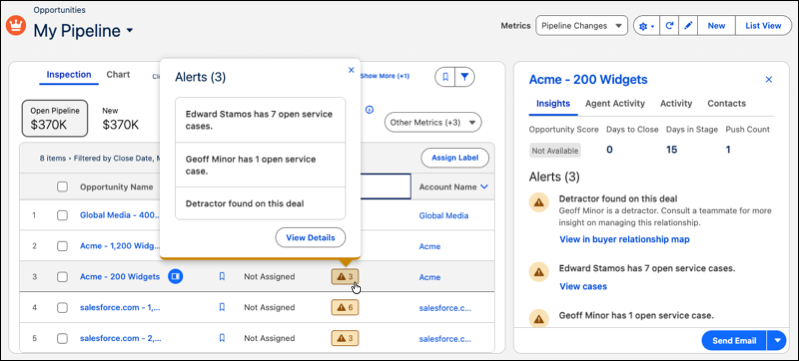
The new Alerts column in Pipeline Inspection shows a count of the most urgent deal insights, so sales reps can quickly spot and address at-risk opportunities. The alerts shown depend on your enabled features. For example, insights about service cases appear only if you use Cases. For consistency, the Needs Attention header in the Insights section of the side panel is now also called Alerts.
Where: This change applies to Lightning Experience in Enterprise, Performance, and Unlimited editions with Agentforce Sales.
When: The Alerts column is available in Pipeline Inspection starting in mid-June 2026.
How: To add the Alerts column to the Pipeline Inspection view, click the gear icon and select Select Fields to Display. Move Alerts to the Visible Fields list and click Save.
In the Pipeline Inspection list view, hover over the count to preview the top three alerts. Click to open the side panel for more details.