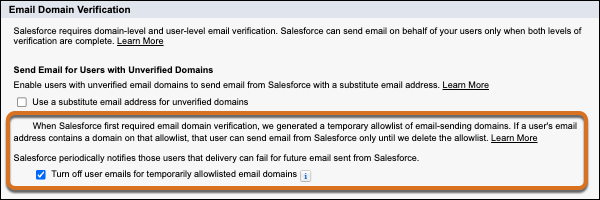
As part of the requirement for email domain verification, Salesforce sends email notifications to users whose email addresses use an unverified domain. Users receive a notification if emails that they recently sent from Salesforce weren’t delivered or if they can’t send email from Salesforce when email domain verification is enforced. To control whether Salesforce sends one of these emails when your org gets Summer ’26, update a Deliverability setting.
Where: This change applies to Lightning Experience, Salesforce Classic, and all versions of the mobile app in all editions except Salesforce Free Suite and Database.com. This change has no impact on trial orgs.
When: Salesforce deploys this change between May 1 and May 7, 2026. If your org is on Spring ’26, affected users receive the first round of notifications during that deployment window and then receive the second round of notifications when your org receives Summer ’26. If your org is on Summer ’26, Salesforce sends the notification with patch 4, which Salesforce deploys starting on May 5, 2026.
To get the version and patch of your org, go to Trust Status, search for your My Domain name or instance, and then click the Maintenance tab.
Why: Your internal users receive one of two notifications per sending event. Both emails instruct the user to contact their Salesforce admin.
Experience Cloud site users, Salesforce Site users, and organization-wide email addresses are excluded from these notifications. If “Use a substitute email address for unverified domains” is enabled on the Deliverability page in Setup, these email notifications aren’t sent.
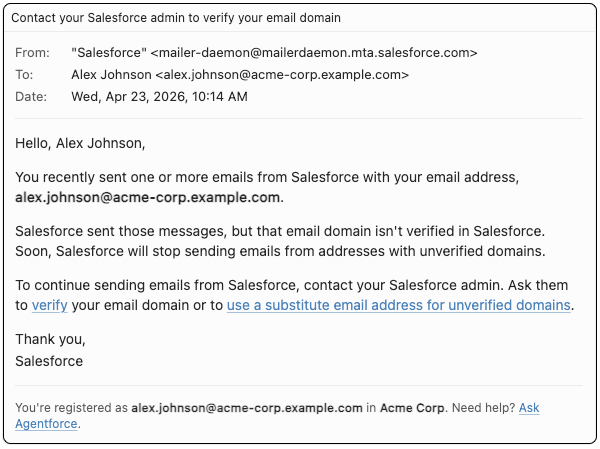
- If the user's email address or reply-to address uses an unverified domain that's on the
temporary allowlist, they receive this email.
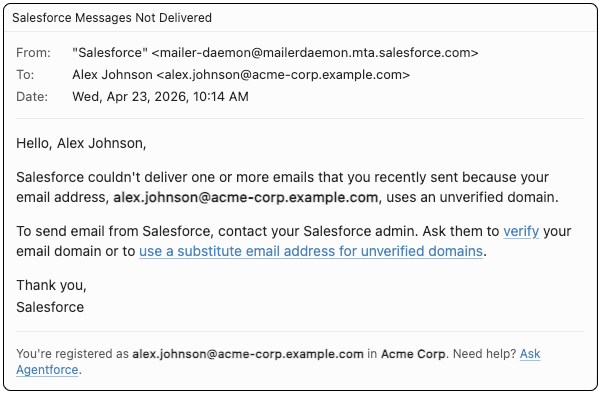
- If the user recently sent an email from Salesforce that wasn't delivered because of an
unverified domain, they receive this email.
How: To enable users with unverified email domains to send email from Salesforce, use a substitute email domain. See Keep Email Flowing for Users with Unverified Domains.
To stop the second round of email notifications for users with an email address or reply-to address that uses an unverified domain that's on the temporary allowlist, enable a deliverability setting. After the initial change is deployed to your org, from Setup, in the Quick Find box, enter Deliverability, and then select Deliverability. Then enable Turn off user emails for temporarily allowlisted email domains. That setting is only available when “Use a substitute email for unverified domains” is disabled.