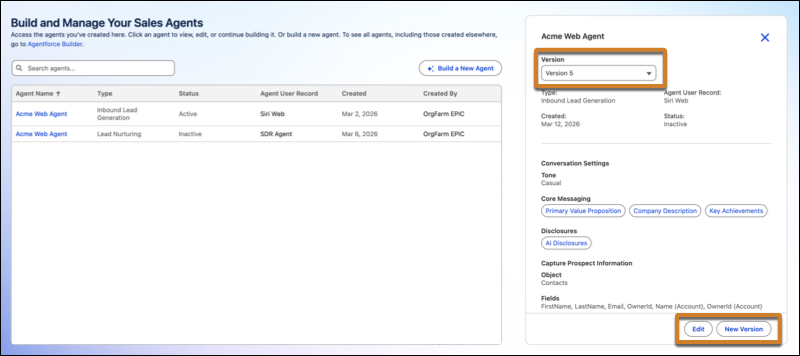
After you set up and activate an Inbound Lead Generation or Lead Nurturing agent, you may want to make changes to it later. To edit an existing agent, you can now create a new version of the agent with the same settings or update an existing version.
Where: This change applies to Lightning Experience in Enterprise, Performance, and Unlimited editions with Sales Cloud and the Agentforce Lead Nurturing add-on. Setup for agents is available on the desktop site.
When: This feature became available starting March 13, 2026.
Why: These are some reasons you might want to edit an agent.
- To make changes to the agent’s behavior.
- To add newly introduced Agentforce features to your agent. Some features can be added only by creating a new version of your agent.
How: In Salesforce Go, click Agentforce for Sales, and then choose the agent you want to edit. With the agent selected, you can choose to edit the agent, or create a new version with the same settings. You can then edit the settings and use the Preview panel to test the agent behavior until you are satisfied with the results.