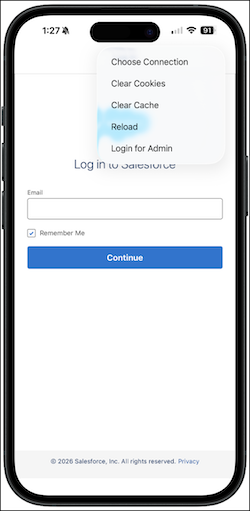
Meet new security requirements with ease using the Login for Admin option in the Salesforce mobile app. This new menu option enables phishing-resistant multi-factor authentication (MFA) by using advanced, browser-based authentication. When you log in as an admin, you can use passkeys: the fastest and most secure way to access your org. Simply enter your username, and the app prompts you to verify your identity with a passkey or password.

Where: This change applies to the Salesforce mobile app for iOS and Android.
When: This change will be available starting June 29, 2026.
Who: This feature is available to all Salesforce mobile app users, with the Login for Admin option designed for admin users who need to meet phishing-resistant MFA requirements.
How: To use Login for Admin, tap the Settings icon on the login screen and select Login for Admin. The app guides you through the secure authentication process, including registering or logging in with a passkey if your org has passkeys enabled.