
Safeguard important service appointments, such as those with customer commitments, by preventing them from being dropped from the schedule during global and in-day optimization. Define which appointments to keep scheduled by using Keep Scheduled Criteria. For example, ensure emergency appointments remain scheduled. During optimization these appointments can move to a different resource or time within the SLA. Previously, you could only pin appointments, limiting the ability to create the most optimal schedule. You can also keep appointments scheduled via API by using the updated Optimize global Apex method, which is helpful when you want to schedule optimization runs and aren't relying on manual actions.
Where: This feature is available in Lightning Experience and Salesforce Classic in Enterprise, Unlimited, and Developer editions with the Field Service manager package installed.
How: In Setup, go to Field Service Settings and verify that Field Service Enhanced Scheduling and Optimization is enabled. In the Field Service Admin app, click Field Service Settings. Under Optimization, in the Scheduled Jobs tab, configure Keep Schedule Criteria.
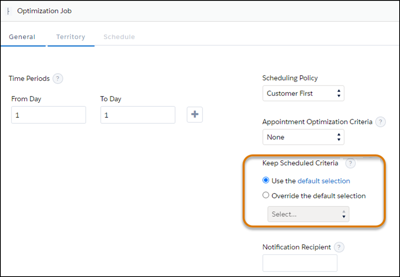
Then under Optimization, in the Logic tab, you can define a default value to show for this setting. Then, enable the Include Keep Scheduled in Optimize Window custom permission set to show this field in the Optimize window accessed from the dispatcher console.
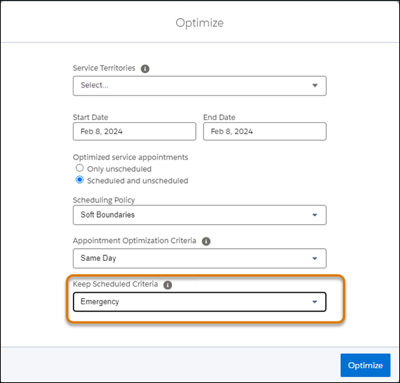
Alternatively, use the new KeepApptScheduled property with the Optimize global Apex method, to define the value of the designated Boolean field within the Service Appointment object. For example, define IsEmergency to ensure all appointments with this property stay scheduled during optimization.