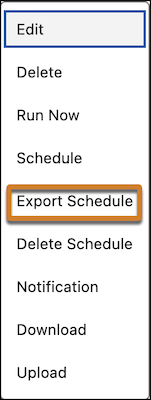
Export your Salesforce Data Pipelines recipe schedules as calendar format (ICS) for quick reference and visibility in your calendar. For instance, share a recipe's run schedule with stakeholders in other teams to coordinate data readiness and reporting deadlines.
Where: This change applies to Salesforce Data Pipelines in Lightning Experience and Salesforce Classic. Salesforce Data Pipelines is available for an extra cost in Enterprise, Performance, and Unlimited editions.
How: From Setup, in the Quick Find box, enter Analytics, and then select Settings. Select Allow users to export recipe schedules and then save your changes.
In Data Manager, on the Recipes tab, select a scheduled recipe and click the Export Schedule action in the dropdown menu.