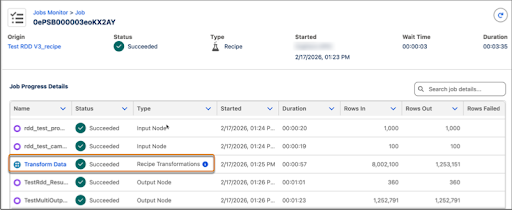
Use the recipe inspector to troubleshoot issues and improve performance. Deep-dive into your recipe jobs to view the detailed information at each stage of the flow. Monitor individual node performance and status. You can quickly identify a slow join or a transformation node that failed to make fixes immediately.
Where: This change applies to Salesforce Data Pipelines in Lightning Experience and Salesforce Classic. Salesforce Data Pipelines is available for an extra cost in Enterprise, Performance, and Unlimited editions.
How: In Data Manager, click Jobs Monitor. Select a job to view the Job Progress details. To inspect the recipe transformations, click Transform Data.