
Navigate through various levels of data granularity directly within Data 360 reports built on semantic models. Perform seamless drill-down and roll-up actions on related fields, such as product categories or dates, using dimensional hierarchies. Instead of manually selecting individual fields, move seamlessly between levels to quickly compare performance across dimension groups.
Where: This change applies to Data 360 in Developer, Enterprise, Performance, and Unlimited editions.

How: In Setup, in the Quick Find box, enter Reports and select Reports and Dashboards Settings. Then, select Enable Dimensional Hierarchy in Data Cloud Reports (Beta). To navigate data levels in the Report Builder, add a hierarchy field from the Field Selector to your Columns or Group Rows sections.
To drill down and display the next level in the hierarchy, click + next to the dimension hierarchy field, or select Drill Down from the column actions menu.
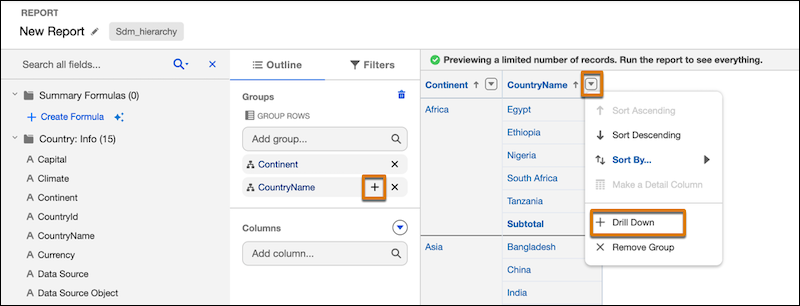
Similarly, to roll up to the top level of the hierarchy, click X next to the to the dimension hierarchy field or select Remove Group from the column actions menu.