
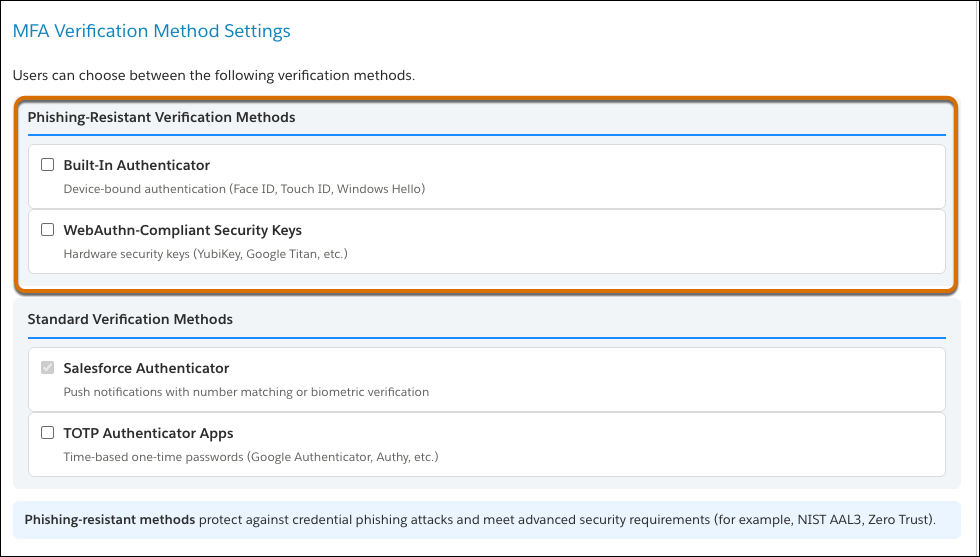
Account Manager now supports additional phishing-resistant verification methods, including passkeys, security keys, and built-in platform biometric authenticators such as Touch ID, Face ID, and Windows Hello. After you enable phishing-resistant methods on the organization detail page, Account Manager users can register those methods and use them at login. Phishing-resistant methods use FIDO2/WebAuthn to bind credentials to Account Manager, so attackers can't reuse them on a spoofed site. We highly recommend that Admin users register with one of the phishing-resistant verification methods.
Where: This change applies to Account Manager for B2C Commerce.
How: From your organization detail page, select the phishing-resistant verification methods that you want to allow. Users see the newly allowed methods when they register a verification method or add one from their account information.
See Also
- Salesforce Help: Register Verification Methods for Multi-Factor Authentication in B2C Commerce
- Salesforce Help: Verify Your Identity with Multi-Factor Authentication in B2C Commerce
- Salesforce Help: Register a Passkey for Identity Verification in B2C Commerce (can be outdated or unavailable during release preview)
- Salesforce Help: Register a Security Key for WebAuthn Identity Verification in B2C Commerce