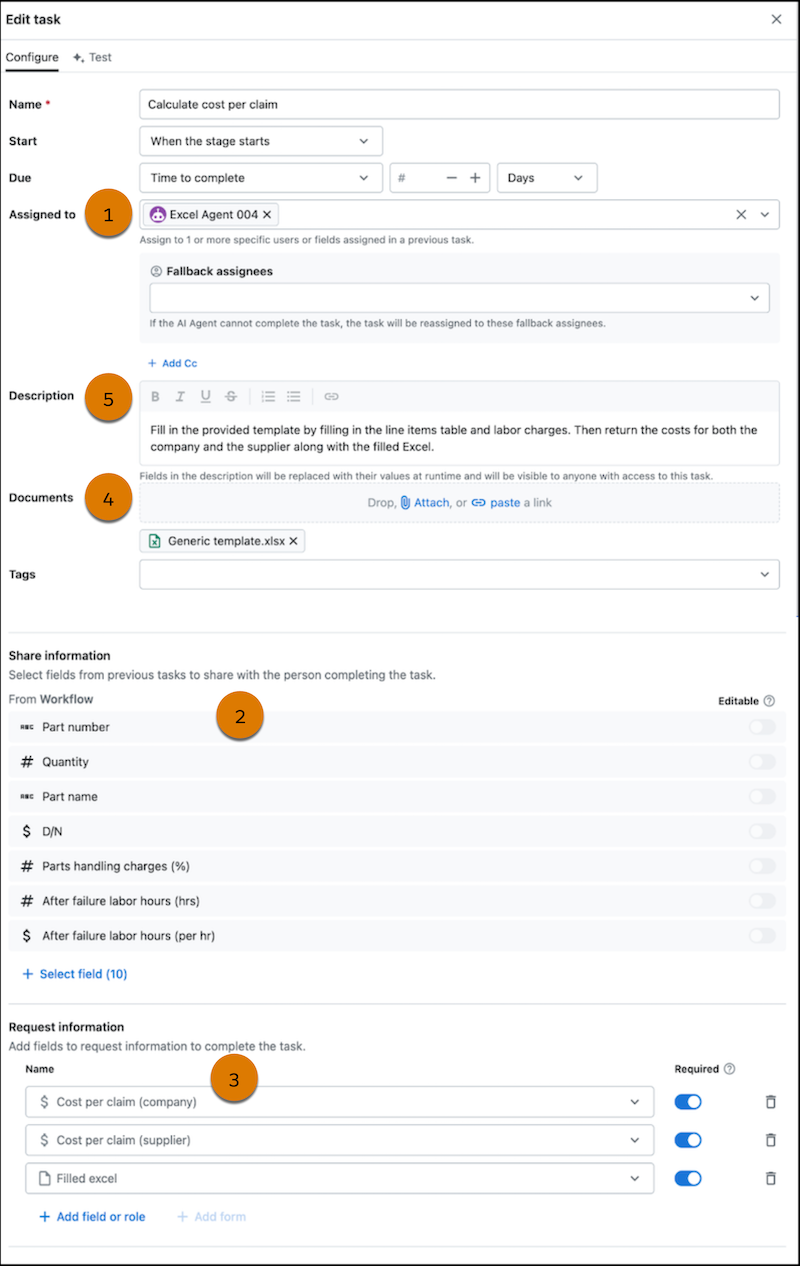
Build an automation from an existing or generated spreadsheet with the Excel Agent (beta). Provide the shared fields as values to add, the requested fields as values to get back, and explain how to use that data. Then the agent automatically inputs the shared field values, runs all formulas, and extracts the requested field values. It’s also easy to see what the agent does when the task runs. Instead of digging through complex agent audit histories, users can download the Excel file to review all formulas and processed data in one place.
Where: This feature applies to an Agentforce Operations workspace that's external to Salesforce for an additional cost. To purchase an Agentforce Operations license, contact your Salesforce account executive.

How: Assign a task to the Excel Agent (1) and then add fields in the Share information (2) and Request information (3) sections. To use an existing Excel file, for Documents (4), upload the file. Then, for Description (5), tell the agent where to add the shared fields to the spreadsheet and how to extract the requested values. If you don't have an existing Excel file, for Description (5), describe the calculations or logic you want to perform on the shared fields to generate values for the requested fields.