You can now provide field label alternatives and extra instructions to make sure that the agent finds the correct data. The new and improved Document Reader Agent (beta) can extract field values from unstructured documents, such as PDFs and images. Also, the agent can handle multi-value fields and can extract tabular data, such as line items in a PDF.
Where: This feature applies to an Agentforce Operations workspace that's external to Salesforce for an additional cost. To purchase an Agentforce Operations license, contact your Salesforce account executive.

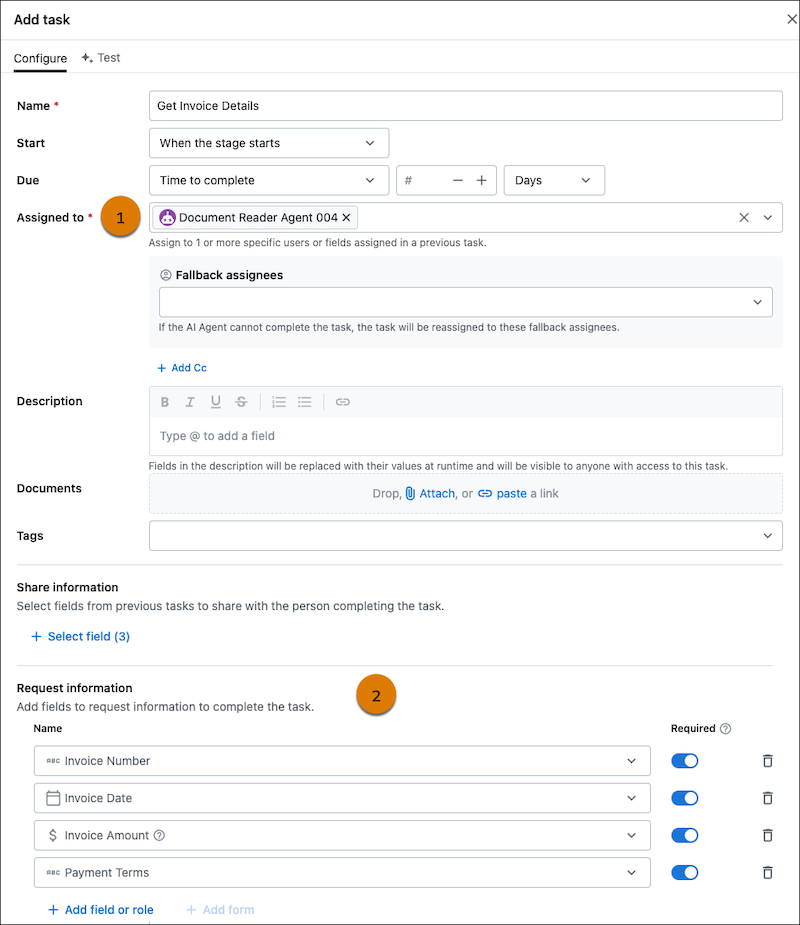
How: Assign a task to the Document Reader Agent (1). In the Requested information section (2), add a form or the individual fields that you need values for. To extract line items from a document, add a form with a table in it.
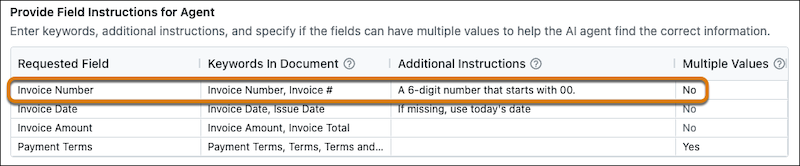
In the Provide Field Instructions for Agent section, optionally provide information to help the agent find what you need. For example, the Invoice Number field can show up as Invoice Number or Invoice # and has these additional instructions for the AI agent: A 6-digit number that starts with 00. If it's a text field, optionally specify if it can have multiple values by entering Yes for Multiple Values.