
Prevent abrupt execution failures and limit exceptions if your org exceeds its daily asynchronous job limit. You can now enqueue Queueable and future method jobs up to a new elastic limit, which is twice the size of your org’s licensed daily limit. Asynchronous jobs that surpass the licensed daily limit are processed at a throttled rate.
Where: This feature is available only to demo and production orgs where the “Use elastic
limits for asynchronous Apex jobs (Beta)” setting is enabled. The
DailyAsyncApexElasticExecutions and the
DailyAsyncApexProcessed OrgLimit instances are available in API version 67.0
and later. This feature is available in Lightning Experience and Salesforce Classic in
Enterprise, Performance, Unlimited, and Developer editions.

Elastic Limits for Queueable Apex and Future Methods is a pilot or beta service that is subject to the Beta Services Terms at Agreements - Salesforce.com or a written Unified Pilot Agreement if executed by Customer, and applicable terms in the Product Terms Directory. Use of this pilot or beta service is at the Customer's sole discretion.
How: In Setup, in Apex Settings, turn on Use elastic limits for asynchronous Apex jobs (Beta).
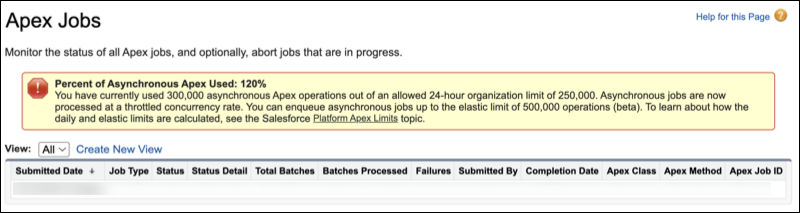
To check your asynchronous job usage against the daily and elastic limits, see the Apex Jobs page in Setup. A banner shows the number of asynchronous jobs processed in the past 24 hours, along with the org’s daily and elastic limits. It also indicates whether asynchronous processing is being throttled.
You can also check usage by using the System.OrgLimits.getMap() method to
access the DailyAsyncApexExecutions,
DailyAsyncApexElasticExecutions, and the
DailyAsyncApexProcessed OrgLimit instances.