
You can browse solutions featuring MCP servers on AgentExchange, explore detailed information about tools and resources, and install applications without custom development—all within your Agentforce workflow. This integration makes your agents more efficient by giving them access to external tools and resources that they need for your business. Before you install an application, view its details to see what tools and external resources are included. Once installed, your agents can access these external resources as part of their workflows.
Who: This change impacts Agentforce admins and developers.
Where: This change applies to Agentforce Registry in Setup.
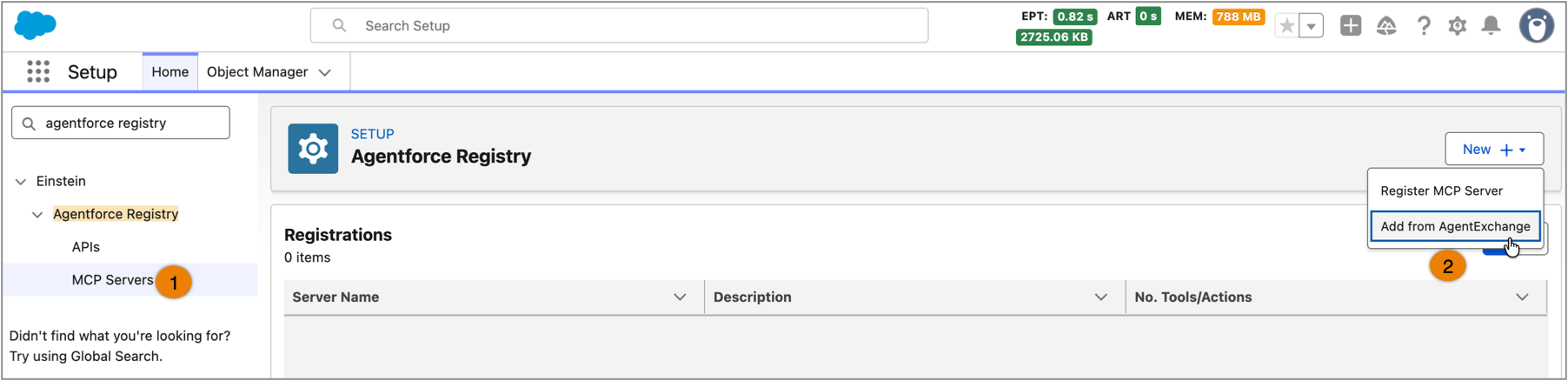
How: To browse solutions featuring MCP servers, from Setup, in the Quick Find box, enter Agentforce Registry, and then select MCP Servers (1). Click New+ to browse AgentExchange (2).
The listing cards on AgentExchange show the MCP server count alongside other Agentforce content, such as agents, subagents, and actions. Select a listing card to view the app details. The details page provides a brief summary and count of tools and resources associated with the MCP servers. To view all the tools and resources, visit AgentExchange.