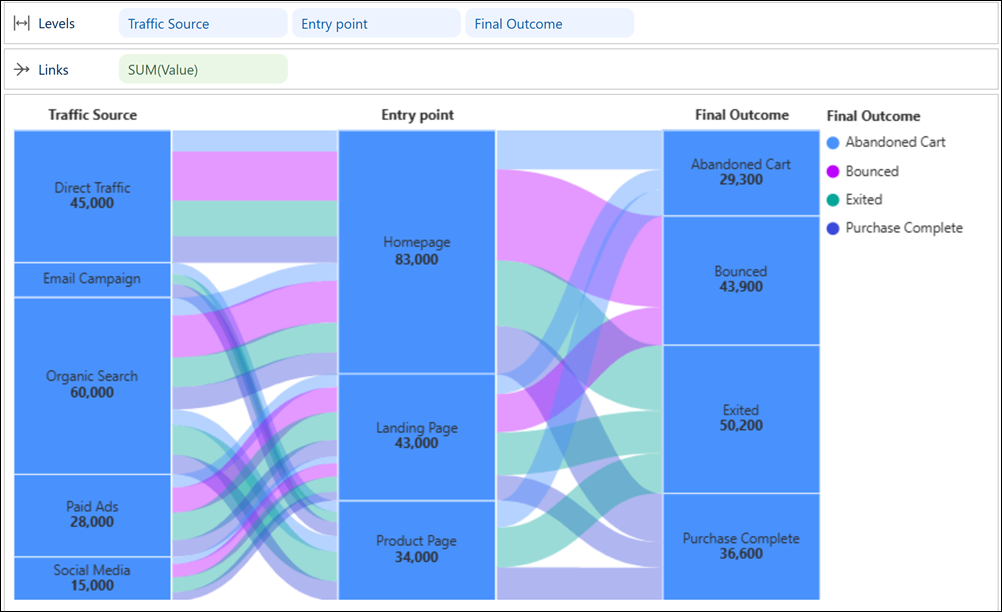
Analyze how values change across stages or categories as they move through a process or workflow with Sankey charts in Tableau Next. Compare the magnitude of flows between stages to identify which paths contribute the most and where values drop off and need attention. Visualize complex many-to-many relationships clearly, showing how multiple inputs distribute across different outcomes.
Where: This change applies to Tableau Next in Enterprise, Performance, and Unlimited editions.
Why: For example, in a Sankey chart, evaluate how different traffic sources progress through your website, and compare which journeys produce the highest order values and where customer conversions decline.
How: To create a Sankey chart, select the  thumbnail from the Suggest pane. Add traffic source, entry point, and final outcome
to Levels, and order value to Links.
Optionally, color flows by outcome to make traffic patterns easier to spot.
thumbnail from the Suggest pane. Add traffic source, entry point, and final outcome
to Levels, and order value to Links.
Optionally, color flows by outcome to make traffic patterns easier to spot.