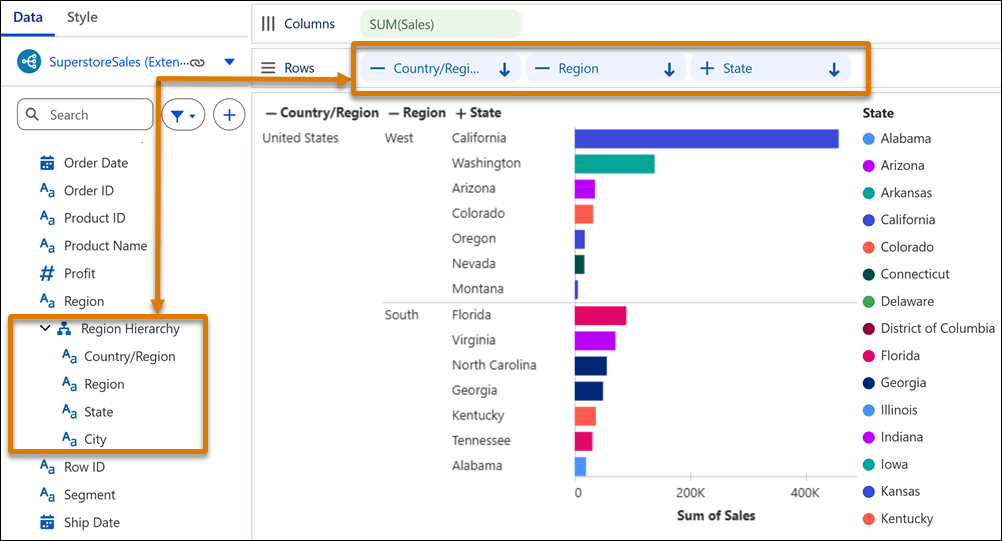
Explore data in Tableau Next efficiently with dimension hierarchies to move between high-level summaries and detailed breakdowns. Define hierarchies on related dimensions or date fields from a single data object or across multiple data objects in a semantic model. And include the hierarchy in visualizations or tables to roll up or drill down analysis more easily.
Where: This change applies to Tableau Next in Enterprise, Performance, and Unlimited editions.
Why: For example, visualize total sales by country, then drill into region and state to identify which locations are driving growth or contributing to declines. Or, in the table view, review profits by quarter, then roll them up to see performance for the year.
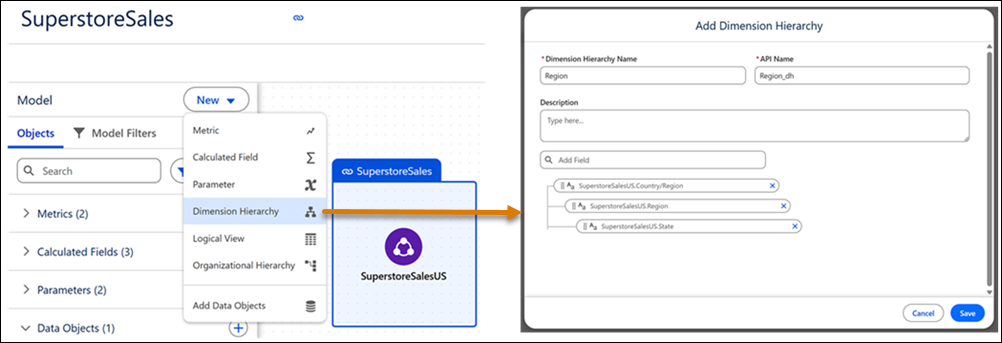
How: To create a dimension hierarchy, select Dimension Hierarchy from a semantic model’s New dropdown. Name the hierarchy, add its fields, and save it.
To add the hierarchy to a visualization or table, in the Visualization Builder, drag it onto Rows or Columns.