You can now manage data visibility and system speed in your workspace. This update supports actions such as reassigning data sources to different data spaces and renaming fields that align with business terminology. Also, you can improve data performance by setting custom refresh intervals and acceleration for faster data retrieval.
Where: This change applies to Tableau Next in Enterprise, Performance, and Unlimited editions.
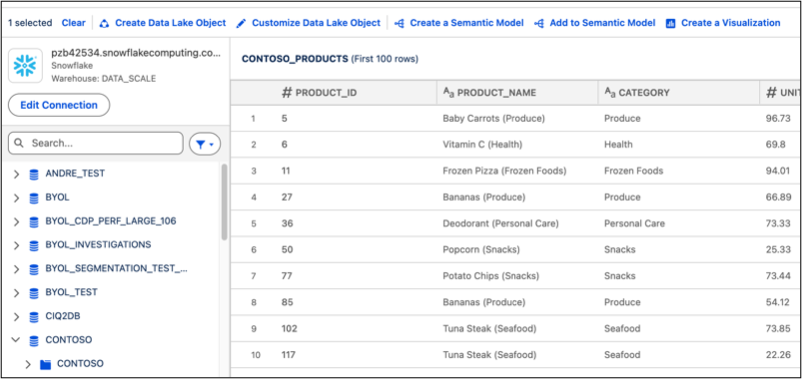
How: To rename fields, from your workspace open or add an external data source. Click Customize Data Lake Object and locate the column you want to rename. Type in a new name and save it.
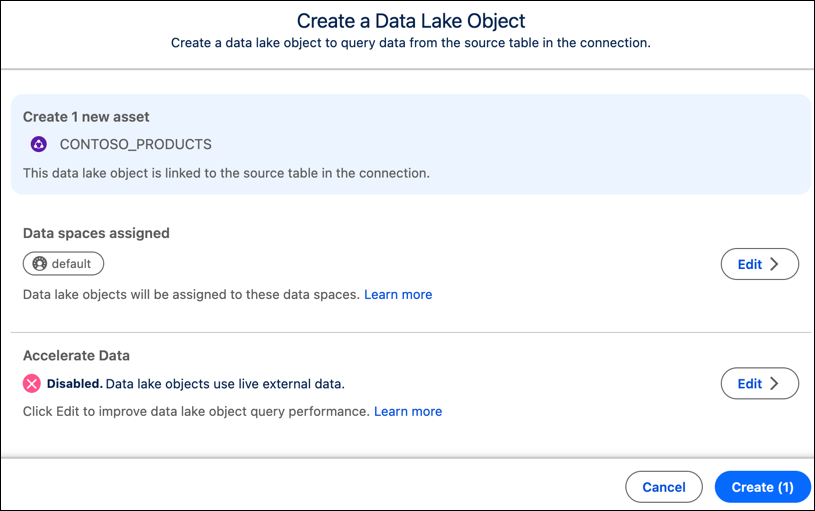
To reassign a Data Lake Object to a different data space, click Create Data Lake Object. Click Edit in the Data spaces assigned section and select the data space you want. To begin a full or incremental refresh, click Edit in the Accelerate Data section.