
Build Enterprise-Ready Agents with Agentforce DX and Agent Script (Generally Available)
Use pro-code tools, such as VS Code and Salesforce CLI, to build hybrid reasoning Salesforce agents. These new types of agents have both the predictability that your business demands and the creativity that large language models (LLMs) make possible.
Where: These new features are available in Salesforce CLI version 2.123.1 and Agentforce VS Code Extension version 1.7.0.
What: Agentforce DX helps pro-code developers build these agents by minimizing context switching, enabling professional DevOps, and simplifying collaboration between low-code and pro-code developers.
On December 10, 2025, we released these beta features:
- Author agents by using Agent Script, the language for building Salesforce hybrid reasoning agents. Agent Script combines the flexibility of natural language for code generation with the reliability of programmatic expressions for handling business rules.
- Easily edit Agent Script files in the VS Code editor with the new Agent Script VS Code extension, which provides standard code editing features: syntax highlighting, visual syntax cues (such as red squiggles for errors), internal validation, and outline support.
- Preview an agent conversation from its Agent Script file with the updated Agentforce DX VS Code Extension. With preview, you get behind-the-scenes details of how your agent is working. The preview supports two modes: simulated (which uses mocked actions) and live mode (which uses real Apex classes, flows, and other resources).
- Generate, validate, preview, and publish an authoring bundle with these new CLI commands.
An authoring bundle is a new metadata type (
AiAuthoringBundle) that represents an agent that uses Agent Script as its blueprint.agent generate authoring-bundle: Generate an authoring bundle from an existing agent spec YAML file.agent validate authoring-bundle: Validate an authoring bundle to make sure that its Agent Script file compiles successfully and you can use it to publish an agent.agent publish authoring-bundle: Publish an authoring bundle to your org, which results in a new agent or a new version of an existing agent.agent preview: Interact with an agent to preview how it responds to your statements, questions, and commands (utterances).
On February 18, 2026, we released the Generally Available product, and we added or changed these features:
- Agentforce Vibes Rules for Agent Script: Agentforce Vibes now includes a global rule for coding Agent Script files.
- Improved Agent Preview: Previewing an agent now works the same regardless of how you started the conversation (using an Agent Script file or a published agent.) Previously you were required to configure extra security using a connected app to preview a published agent.
- Programmatic Agent Preview: Preview an agent programmatically, without
starting an interactive session, with these four new CLI commands. This feature is useful
when you want an agent to test your agent.
agent preview start: Start a programmatic agent preview session.agent preview send: Send a message to an existing agent preview session.agent preview sessions: List all known programmatic agent preview sessions.agent preview end: End an existing programmatic agent preview session and get trace location.
- Enhanced Session Tracer: Get oodles of useful session trace information with the enhanced Agent Tracer panel in VS Code.
- Simpler Authoring Bundle Generation: You're no longer required to generate an agent spec YAML file when generating an authoring bundle. This feature makes it even easier to get started with Agent Script agents.
Agentforce DX is the pro-code equivalent of the newly released Agentforce Builder UI that runs in your org.
How: In general, you can use either a CLI or VS Code command to accomplish most of the tasks of authoring an agent. This example shows how to use a CLI command to generate an authoring bundle from an agent spec YAML file. The equivalent VS Code command is AFDX: Create Agent.
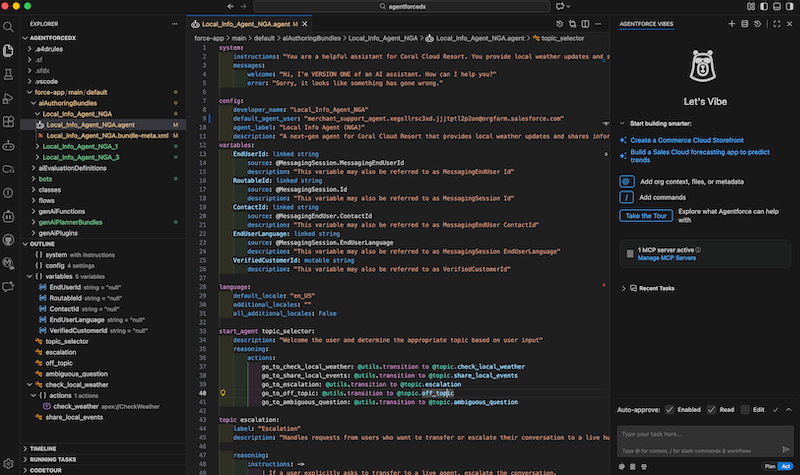
sf agent generate authoring-bundle --spec specs/agentSpec.yaml --name "Local Info Agent" --target-org my-orgThen use the VS Code editor to customize the agent by coding its Agent Script file, which is the agent's blueprint. You can also vibe code the Agent Script file by using Agentforce Vibes.
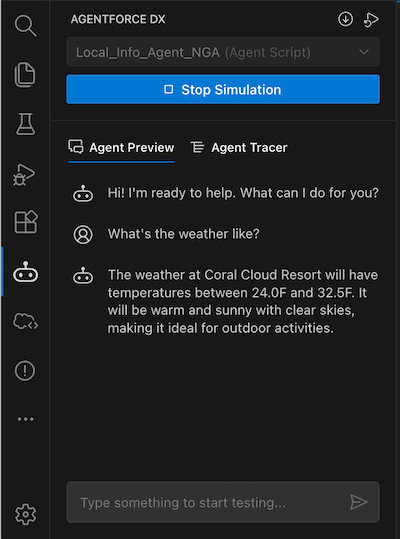
Test the agent interactively by having a simulated conversation with it in the VS Code agent
preview panel. You can also use the agent preview CLI command.
When you're ready to publish your agent to your org, you can use this CLI command or the AFDX: Publish This Agent VS Code command.
sf agent publish authoring-bundle --target-org my-orgSee Also
- Agentforce Developer Guide: Author Agents with Agentforce DX (Beta)
- Salesforce CLI Command Reference: agent Commands
- Visual Studio Marketplace: Agentforce DX for Visual Studio Code Extension
- Agentforce Developer Guide: Get Started with Agent Script (Beta)
- Salesforce Help: Build Enterprise-Ready Agents with the New Agentforce Builder (Beta)