
Enhance the accuracy and details of service plans by grounding Service Assistant in Messaging Session and Voice Call records. When these records are attached to a case, Service Assistant analyzes the transcripts to create a case summary that summarizes what took place in the conversation and drafts a service plan that continues from where the conversation ended. The grounding process boosts rep productivity by ensuring the service plan continues exactly from where the prior interaction left off and avoids repeating steps and manual context gathering.
Where: This change applies to Lightning Experience in Enterprise, Unlimited, and Developer editions with Einstein for Service, Agentforce for Service, and Agentforce 1 editions.
When: This feature was originally released on December 18, 2025. We’ve included it in the Spring '26 Release Notes to increase the visibility of the feature.
Who:
- To set up Messaging Session and Voice Call record grounding for Service Assistant, Salesforce admins need the Service Planner Builder permission set.
- To ground service plans in Messaging Session or Voice Call records, the ServicePlanner User
needs the Conversation Grounding Access custom permission set that has these permissions.
- App permission: Access Conversations Entries, View All Voice and Video Calls
- Messaging Session object permission: Read, View All Records
- To view Messaging Session or Voice Call information in a service plan, service reps need the Service Planner User permission set.
Why: By automatically grounding the case summary and service plan in the related conversation transcript, Service Assistant limits the need for service reps to manually review and synthesize the Messing Session or Voice Call record. In addition, the service plan starts from where the original conversation ended, which speeds up case resolution and prevents the duplication of resolution steps already taken the conversation.
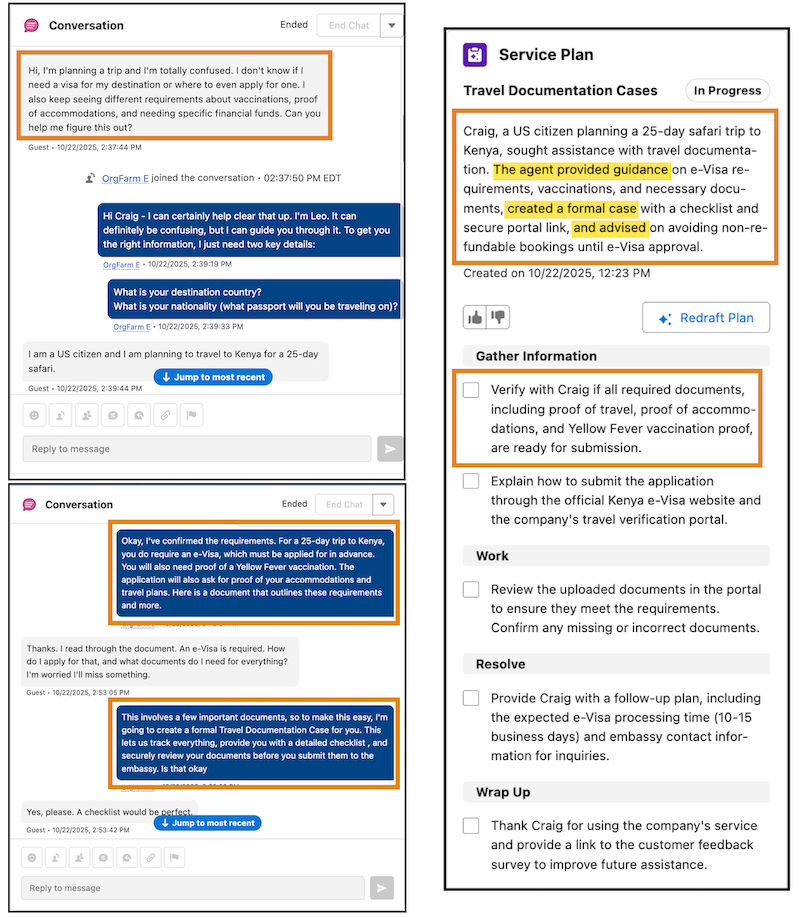
How: Assign your users the required permissions and then turn on Messaging and Voice record grounding in the Case tab of the Service Assistant Setup page.
