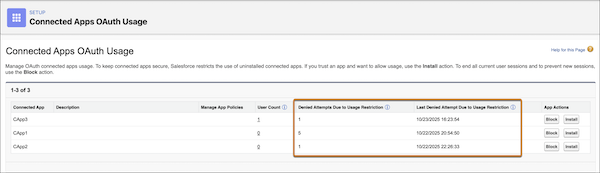
You can now track denied attempts to use connected apps that aren't installed in your org (uninstalled apps for short). By tracking these denied attempts, you can identify both legitimate and suspicious attempts to use uninstalled apps. You can decide whether to allow usage of the app or to block it entirely.
Where: This change applies to Lightning Experience and Salesforce Classic (not available in all orgs) in all editions.
Why: To prevent unauthorized access to your data, Salesforce automatically denies attempts to use uninstalled connected apps unless a user has the Approve Uninstalled Connected Apps user permission. This user permission is intended only for highly trusted users, like admins. As a result, non-admin users can be blocked from using uninstalled apps that have legitimate use cases. Now that you can track denied attempts, you can easily see when a user is stuck in this situation. To allow these users to access legitimate apps from trusted developers, install these apps.
By tracking denied attempts, you can also see if a threat actor is trying to use connected apps to get access to your org. To tighten security, block suspicious apps. Blocking a connected app ends all sessions and prevents further usage, even for users with the Approve Uninstalled Connected Apps user permission.
How: On the Connected Apps OAuth Usage page in Setup, review the Denied Attempts Due to Usage Restriction column. You can also review the date and time of the most recent denied attempt.