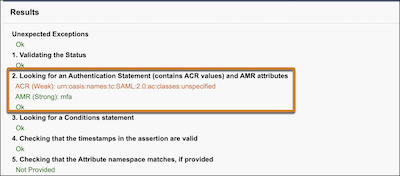
We made it easy to check for strong authentication methods in SAML responses from your single sign-on (SSO) identity provider. You can now use the SAML Assertion Validator to check the strength of Authentication Method Reference (AMR) and Authentication Context Class Reference (ACR) values. Previously, the SAML Assertion Validator showed you ACR values but not AMR values, and it didn't include any information about their strength.
Where: This change applies to Lightning Experience and Salesforce Classic in all editions. This change is currently English-only. Translations are scheduled to be available in late March 2026.
How: On the Single Sign-On Settings page, go to the SAML Assertion Validator. Enter your SAML assertion or select a specific configuration. Check section 2 in the Results section for ACR and AMR values. Here's an example.