
Protect your data from unauthorized use of old, idle refresh tokens. For improved external client app and connected app security, set a 30-day limit to the idle refresh token TTL, which is the amount of time a refresh token can be inactive before it expires. The idle TTL works as a sliding window: each time the token is used within the 30-day period, its idle TTL resets.
Where: This change applies to Lightning Experience and Salesforce Classic in all editions.
How: In your external client app or connected app settings, turn on Limit Idle Refresh Token Time-to-Live (TTL) to 30 Days. When you enable the limit, the refresh token policies UI changes slightly, with a new heading and three policy options instead of four. Here's an example for external client apps (1) and for connected apps (2).
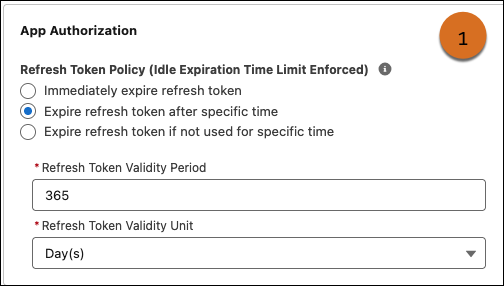
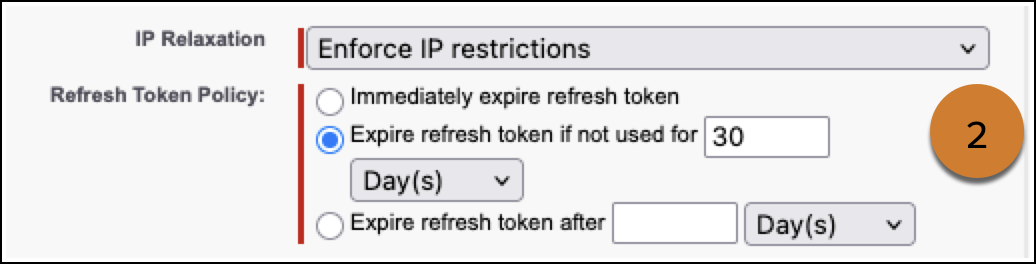
Here’s how this limit changes the refresh token policy behavior for you and for subscribers.

| Refresh Token Policy | Behavior Changes |
|---|---|
|
Refresh token is valid until revoked This policy name is the same for external client apps and connected apps. |
This policy is no longer valid with the idle TTL limit enforced. In the UI, this option becomes hidden and the policy selection changes to “Expire refresh token if not used for specific time” with the validity period set to 30 days. Salesforce doesn’t automatically update the app’s metadata to reflect this change. To fix the mismatch, update the external client app or connected app metadata. |
|
Immediately expire refresh token This policy name is the same for external client apps and connected apps. |
Refresh tokens still use the validity period configured in the app policies. If it’s longer than 30 days, the idle TTL limit also applies. For example, if the configured validity period is 1 year, idle tokens still expire after 30 days. With continuous use, tokens can last up to 1 year. |
|
In external client apps—Expire refresh token after specific time In connected apps—Expire refresh token after {number} {unit of time} |
Refresh tokens still use the validity period configured in the app policies. If it’s longer than 30 days, the idle TTL limit also applies. For example, if the configured validity period is 1 year, idle tokens still expire after 30 days. With continuous use, tokens can last up to 1 year. |
|
In external client apps—Expire refresh token if not used for specific time In connected apps—Expire refresh token if not used for {number} {unit of time} |
This validity period that you configure for this policy already works as an idle TTL with a sliding window. The only change is that the configured validity period now can’t be longer than 30 days. Salesforce doesn’t automatically update the UI and metadata to reflect the new behavior. To match the behavior, set the validity period to 30 days and encourage subscribers to do the same. If the validity period is longer than 30 days, you get an error if you try to save any changes to the policy. |