
See at a glance whether a recent violation blocked a resource request or redirection with the new Impact field on the Trusted URL and Browser Policy Violations list. Violations with an impact of Reported block that resource request only when you enable a stricter CSP policy, such as when you enable Adopt Updated CSP Directives in Session Settings. Previously, you used the DISPOSITION field of the CSP Violation Event Type object to determine whether a violation was enforced or reported.
Where: This change applies to Lightning Experience and Salesforce Classic in Enterprise, Performance, Unlimited, and Developer editions.
How: In Setup, find and select Trusted URL and Browser Policy Violations. The impact of blocked redirections and malformed URLs is always Blocked.
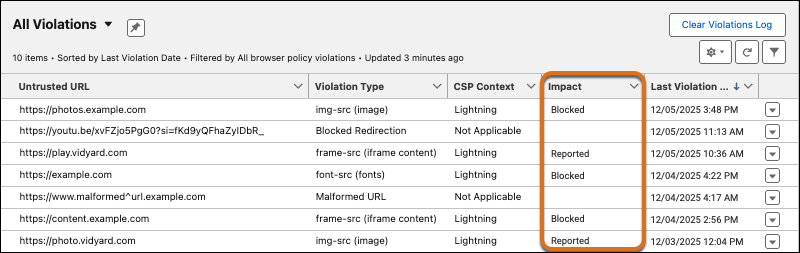
In orgs created in Spring ’26 and later, the Impact field appears by default. In orgs created before Spring ’26, add the field to the list view.