---
schema_version: "1"
id: a441a26618f5f8d49945ee0792305d3503ae02223b626e5b75d6443faafecc74
title: Other Improvements in Visual Studio Code Based Modeler
collection: admin
version: current
locale: en-us
portal_url: https://docs.salesforce.com/admin/current/en-us/release-notes/260-0-0/rn_retail_vs_code_modeler_other_improvements.md
canonical_url: https://help.salesforce.com/s/articleView?id=release-notes.rn_retail_vs_code_modeler_other_improvements.htm&release=260&type=5
source_site: help.salesforce.com
content_type: documentation
content_hash: 57ed1931bb0a1f764da13755b57618c82f2507931b5cab3d0760ab77ede617af
description: The PDF preview now automatically splits content pages, improving readability without affecting thermal printing. Adapt page layout rules to append more columns and apply center alignment. Configure day and year values in correct formats for all supported languages.
products:
- Cross Cloud Packages Solutions
release: "260"
---
# Other Improvements in Visual Studio Code Based Modeler
The PDF preview now automatically splits content pages, improving readability without affecting thermal printing. Adapt page layout rules to append more columns and apply center alignment. Configure day and year values in correct formats for all supported languages.
**Where:** This change applies to Lightning Experience in Enterprise and Unlimited editions with Consumer Goods Cloud.
**Why:** Visual Studio Code Based Modeler offers these enhancements.
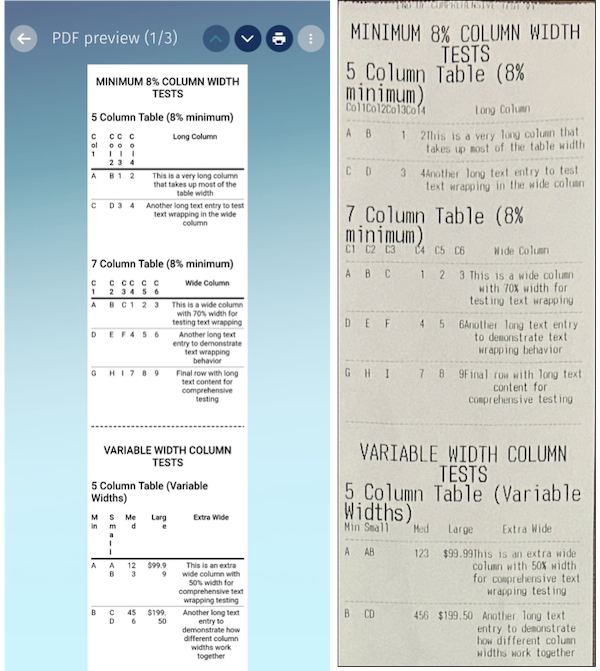
- PDF preview readability with auto-spilt pages: Content is now automatically split into pages in the preview. Previously, all content appeared on a single page when the PDF height was set to `auto` for 3-inch Bluetooth thermal printers. This change makes it easier to read in the preview without affecting the actual thermal printing. See [Considerations and Guidelines for Bluetooth Thermal Printer and Print Layout Setup](https://help.salesforce.com/s/articleView?id=ind.cg_concept_bluetooth_thermal_printer_considerations_limitations.htm&language=en_US).
- Page layout rules and text alignment: Add more columns to your 3-inch PDF prints to create detailed and readable documents. You can set the minimum width requirement for `| ` elements in the print layout upto 8%. You can also center align ` | ` elements. See [Considerations and Guidelines for Bluetooth Thermal Printer and Print Layout Setup](https://help.salesforce.com/s/articleView?id=ind.cg_concept_bluetooth_thermal_printer_considerations_limitations.htm&language=en_US).
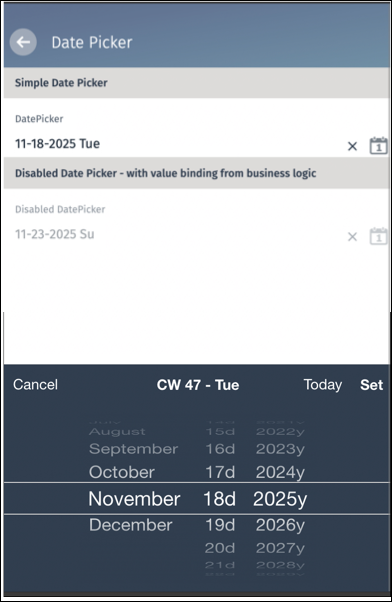
- International formatting in date selection - Configure the `PickerDaySuffix` and `PickerYearSuffix` attributes in your locale contract to show day and year values in correct format in the date wheel for all supported languages. See [Localize Date, Time, and Numbers](https://help.salesforce.com/s/articleView?id=ind.modeler_vscode_locale_localize_date_numeric_format.htm&language=en_US) and [DatePicker UI Control](https://help.salesforce.com/s/articleView?id=ind.modeler_vscode_datepicker_control.htm&type=5&language=en_US).
For example, design your documents to cater to languages like Japanese that require "年" (Year) and "日" (Day) characters alongside numeric values.
```
```
 |