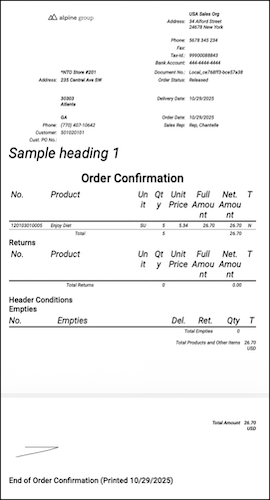
Design custom page dimensions and override default formatting by using the styles node. The style designed for a paragraph applies to all paragraph elements in the print layout. You can set the style name to paragraph, table, tand headings. Specifying attributes such as font size, margin, bold, and italics is optional.
Where: This change applies to Lightning Experience in Enterprise, Unlimited, Einstein 1, and Agentforce 1 editions with Consumer Goods Cloud.
How: Adapt PrintLayout V2 contracts with page dimensions or custom sizes with
these standard formats - A4 (default), A5, EXECUTIVE, FOLIO, LEGAL, LETTER, and TABLOID.
You can now define pageSize with an array of width and height in points, where 1 inch =
72 points. For example, pageSize="[216, auto]".
Customize or modify the default formatting in your print layouts with the
styles node.
...
  <ReportLayout pageMargins="[5,5,5,5]" pageSize="[216, auto]">
    <styles>
      <style name="paragraph" fontSize="12" bold="true" />
      <style name="tableBody" margin="[0,2,0,2]" italics="true" />
    </styles>
...
The styles node configuration isn’t supported for Bluetooth thermal printers.